
SOL-C01 · Question #71
A Snowflake account administrator needs to configure a resource monitor to limit the credit consumption of a specific virtual warehouse named 'ANALYTICS WH'. The resource monitor should trigger a…
The correct answer is D. Option D. Option D is correct because it follows the required two-step sequence: first using CREATE RESOURCE MONITOR with CREDIT_QUOTA set, FREQUENCY = MONTHLY, and a TRIGGERS clause specifying 80 PERCENT DO NOTIFY and 100 PERCENT DO SUSPEND, then using ALTER WAREHOUSE ANALYTICS_WH SET…
Question
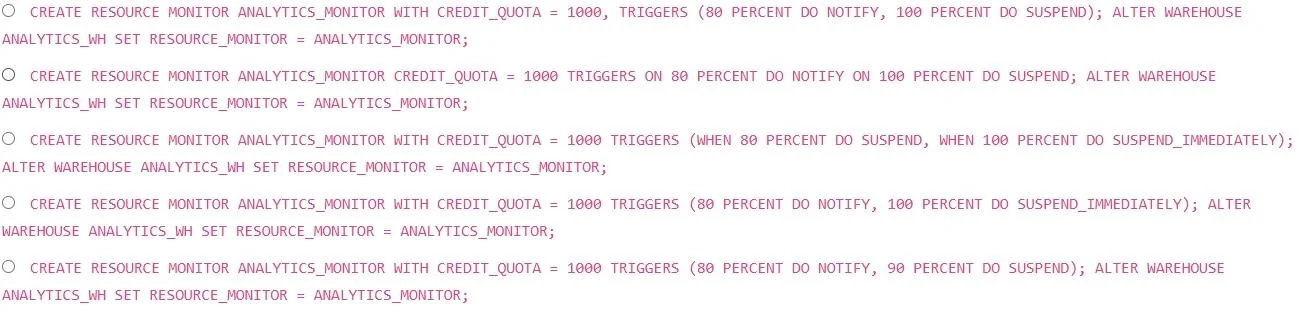
A Snowflake account administrator needs to configure a resource monitor to limit the credit consumption of a specific virtual warehouse named 'ANALYTICS WH'. The resource monitor should trigger a notification when the warehouse consumes 80% of its allocated credits within a calendar month and should suspend the warehouse when it reaches 100%. Which of the following SQL statements, executed in the correct order, would achieve this?
Exhibit
Options
- AOption A
- BOption B
- COption C
- DOption D
- EOption E
How the community answered
(43 responses)- A7% (3)
- B2% (1)
- C2% (1)
- D74% (32)
- E14% (6)
Explanation
Option D is correct because it follows the required two-step sequence: first using CREATE RESOURCE MONITOR with CREDIT_QUOTA set, FREQUENCY = MONTHLY, and a TRIGGERS clause specifying 80 PERCENT DO NOTIFY and 100 PERCENT DO SUSPEND, then using ALTER WAREHOUSE ANALYTICS_WH SET RESOURCE_MONITOR = <monitor_name> to bind the monitor to the specific warehouse. The other options likely fail for one or more common reasons: executing ALTER WAREHOUSE before CREATE RESOURCE MONITOR (wrong order), using SUSPEND_IMMEDIATE instead of SUSPEND at 100% (which kills running queries vs. waiting for them to finish), omitting the NOTIFY trigger at 80%, applying the monitor at the account level rather than the warehouse level, or using an incorrect FREQUENCY value like WEEKLY instead of MONTHLY.
Memory tip: Think "Create, then Attach" - you must create the monitor with its triggers before you can attach it to a warehouse. The trigger actions follow a severity ladder: NOTIFY (alert only) → SUSPEND (finish current queries, then stop) → SUSPEND_IMMEDIATE (kill everything now).
Topics
Community Discussion
No community discussion yet for this question.