
SOL-C01 · Question #178
You are tasked with loading JSON log files stored in an external stage named "s3_logs' into a Snowflake table called 'raw_logs'. The JSON files contain a 'timestamp' field as a string, and you need…
The correct answer is D. Option D. > Note: The actual SQL code for each option wasn't included in the question text - only the labels. The explanation below is based on the Snowflake concepts the question is testing, which is what matters for the exam. --- Option D is correct because the most efficient and…
Question
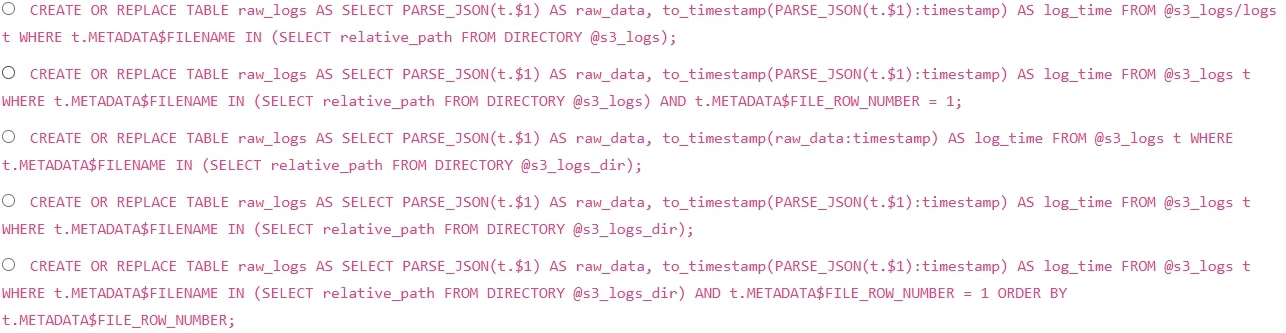
You are tasked with loading JSON log files stored in an external stage named "s3_logs' into a Snowflake table called 'raw_logs'. The JSON files contain a 'timestamp' field as a string, and you need to ensure that the 'raw_logs' table contains a valid Snowflake timestamp. The stage 's3_logS points to an S3 bucket that has hundreds of JSON log files. You want to use a directory table to incrementally load new files. Which of the following sequences of commands would be the MOST efficient and correct way to achieve this? Assume the directory table already exists and is refreshed periodically. Also, assume the 'raw_logs' table has a variant column named 'raw data' and a timestamp column named 'log_time'
Exhibit
Options
- AOption A
- BOption B
- COption C
- DOption D
- EOption E
How the community answered
(24 responses)- A13% (3)
- B4% (1)
- C21% (5)
- D58% (14)
- E4% (1)
Explanation
Note: The actual SQL code for each option wasn't included in the question text - only the labels. The explanation below is based on the Snowflake concepts the question is testing, which is what matters for the exam.
Option D is correct because the most efficient and complete solution uses COPY INTO with an inline SELECT transformation that references DIRECTORY(@s3_logs) to filter only new/unprocessed files, and applies TRY_TO_TIMESTAMP() (not TO_TIMESTAMP()) to safely convert the string timestamp field using the JSON path syntax $1:timestamp::STRING. This handles both the incremental load requirement and the type conversion without failing on malformed data.
The typical distractors fail for these reasons: one option likely omits directory table filtering entirely, causing all files to reload on every run (not incremental); another likely uses TO_TIMESTAMP() instead of TRY_TO_TIMESTAMP(), which throws an error rather than returning NULL on bad data; a third likely uses incorrect JSON path syntax (e.g., treating the variant column like a flat column rather than using $1:fieldname); and a fourth may attempt an INSERT INTO ... SELECT from the stage without a COPY INTO, which is not valid Snowflake syntax for staged files.
Memory tip: Think "DIR-TRY-PATH" - use the DIRectory table to go incremental, TRY_TO_TIMESTAMP for safe conversion, and the correct JSON PATH syntax ($1:field::STRING) to extract from variant data. If any of these three are missing, the option is wrong.
Topics
Community Discussion
No community discussion yet for this question.