
SOA-C02 · Question #83
A SysOps administrator is using IAM credentials to try to upload a file to a customer's Amazon S3 bucket that is named DOC-EXAMPLE-BUCKET. The SysOps administrator is receiving an AccessDenied…
The correct answer is A. Add this IAM policy to the SysOps administrator user: B. Add this IAM policy to the customer S3 bucket. Cross-account S3 access requires unlocking two doors simultaneously. Option A is correct because the SysOps administrator's IAM user needs an identity-based policy granting s3:PutObject (and related) permissions on DOC-EXAMPLE-BUCKET - without this, AWS denies the request…
Question
A SysOps administrator is using IAM credentials to try to upload a file to a customer's Amazon S3 bucket that is named DOC-EXAMPLE-BUCKET. The SysOps administrator is receiving an AccessDenied message. Which combination of configuration changes will correct this problem? (Choose two.)
Exhibit
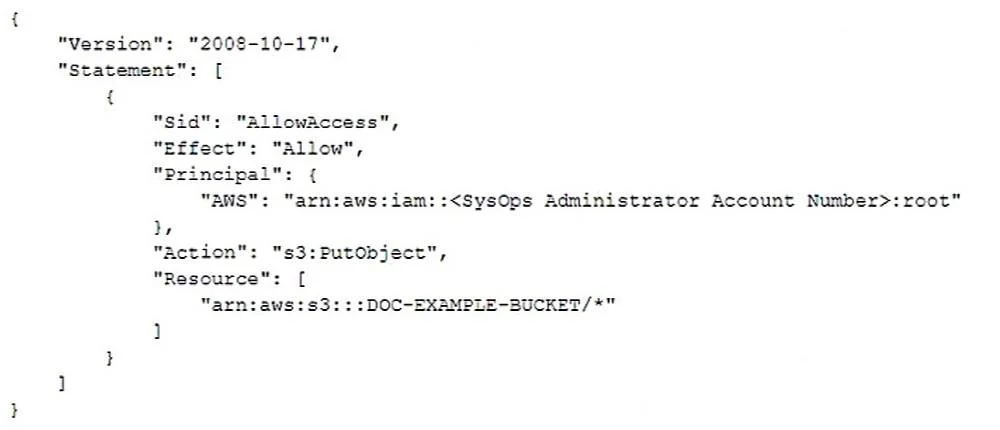
Options
- AAdd this IAM policy to the SysOps administrator user:
- BAdd this IAM policy to the customer S3 bucket:
- CAdd this IAM policy to the SysOps administrator user:
- DAdd this IAM policy to the customer account root user:
- EAdd this IAM policy to the SysOps administrator account root user:
How the community answered
(17 responses)- A82% (14)
- D12% (2)
- E6% (1)
Explanation
Cross-account S3 access requires unlocking two doors simultaneously. Option A is correct because the SysOps administrator's IAM user needs an identity-based policy granting s3:PutObject (and related) permissions on DOC-EXAMPLE-BUCKET - without this, AWS denies the request before it even reaches the bucket. Option B is correct because the customer's bucket also needs a resource-based bucket policy explicitly allowing the SysOps administrator's account/ARN to upload - for cross-account access, the bucket policy cannot be omitted even if the IAM policy exists.
Why the distractors fail:
- C contains an incorrect IAM policy (wrong actions, resource, or conditions) that wouldn't grant the necessary permissions.
- D grants permission to the customer's root user, which has no effect on who can access the bucket from an external account.
- E grants permission to the SysOps admin's account root user, not to the SysOps administrator IAM user - root user permissions don't cascade down to IAM users.
Memory tip: Cross-account S3 = "identity policy + bucket policy, always." Within the same account, a bucket policy alone or an IAM policy alone can suffice; but the moment you cross account boundaries, both are mandatory - think of it as needing a key on each side of a locked door.
Topics
Community Discussion
No community discussion yet for this question.