
SK0-005 · Question #9
When configuring networking on a VM, which of the following methods would allow multiple VMs to share the same host IP address?
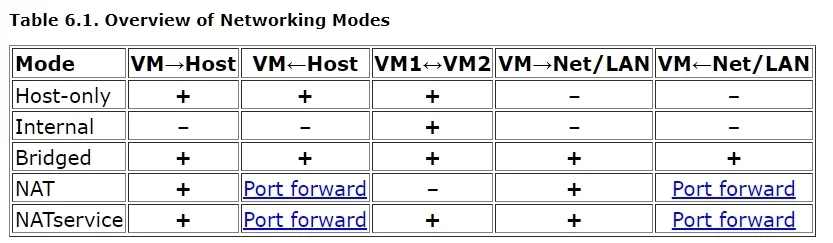
The correct answer is B. NAT. Network Address Translation (NAT) allows multiple virtual machines to share a single host IP address by translating their private IP addresses for external communication.
Question
When configuring networking on a VM, which of the following methods would allow multiple VMs to share the same host IP address?
Exhibit
Options
- ABridged
- BNAT
- CHost only
- DvSwitch
How the community answered
(58 responses)- A7% (4)
- B88% (51)
- C3% (2)
- D2% (1)
Why each option
Network Address Translation (NAT) allows multiple virtual machines to share a single host IP address by translating their private IP addresses for external communication.
Bridged networking connects the VM directly to the physical network, making it appear as an independent device with its own IP address on the same subnet as the host, not sharing the host's IP.
NAT (Network Address Translation) allows multiple VMs to share a single host IP address by providing them with private IP addresses and translating their outbound traffic through the host's IP, effectively hiding the VMs from the external network while enabling internet access. This conserves public IP addresses and simplifies network configuration for VMs.
Host-only networking creates a private network between the host and VMs, allowing communication only among them and the host, without external network access or sharing the host's public IP.
A vSwitch (virtual switch) is a component that enables communication between VMs on the same host and between VMs and the physical network, but it is not a method for sharing a single host IP address itself; rather, it facilitates the network connection where NAT or bridging would then be applied.
Concept tested: VM network modes - NAT
Source: https://learn.microsoft.com/en-us/windows-server/virtualization/hyper-v/learn-more/hyper-v-virtual-switch
Topics
Community Discussion
No community discussion yet for this question.