
SK0-005 · Question #61
A server administrator receives a report that Ann, a new user, is unable to save a file to her home directory on a server. The administrator checks Ann's home directory permissions and discovers the…
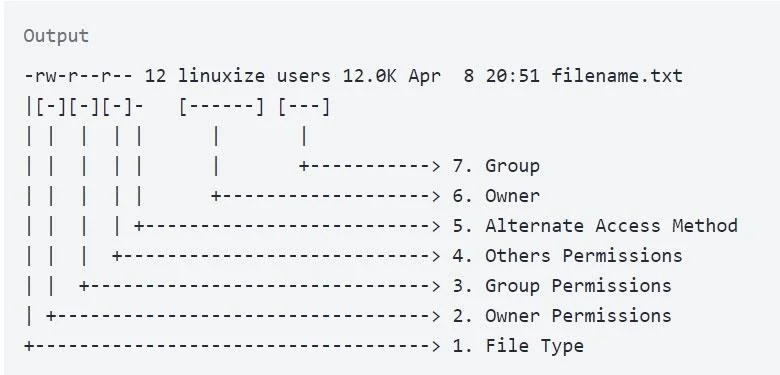
The correct answer is D. chmod 754 /home/Ann. The current permissions dr-xr-xr-- translate to octal 554: the owner (Ann) has read and execute but no write access. Ann needs write permission on her own directory to save files. chmod 754 sets owner=rwx (7), group=r-x (5), others=r-- (4), adding only the write bit for the…
Question
A server administrator receives a report that Ann, a new user, is unable to save a file to her home directory on a server. The administrator checks Ann's home directory permissions and discovers the following:
dr-xr-xr-- /home/Ann Which of the following commands should the administrator use to resolve the issue without granting unnecessary permissions?
Exhibit
Options
- Achmod 777 /home/Ann
- Bchmod 666 /home/Ann
- Cchmod 711 /home/Ann
- Dchmod 754 /home/Ann
How the community answered
(44 responses)- A16% (7)
- B7% (3)
- C5% (2)
- D73% (32)
Explanation
The current permissions dr-xr-xr-- translate to octal 554: the owner (Ann) has read and execute but no write access. Ann needs write permission on her own directory to save files. chmod 754 sets owner=rwx (7), group=r-x (5), others=r-- (4), adding only the write bit for the owner without granting unnecessary access to others. chmod 777 (A) is overly permissive, chmod 666 (B) removes execute bits needed to traverse the directory, and chmod 711 (C) removes group read, which may be unnecessarily restrictive.
Topics
Community Discussion
No community discussion yet for this question.