
SK0-005 · Question #571
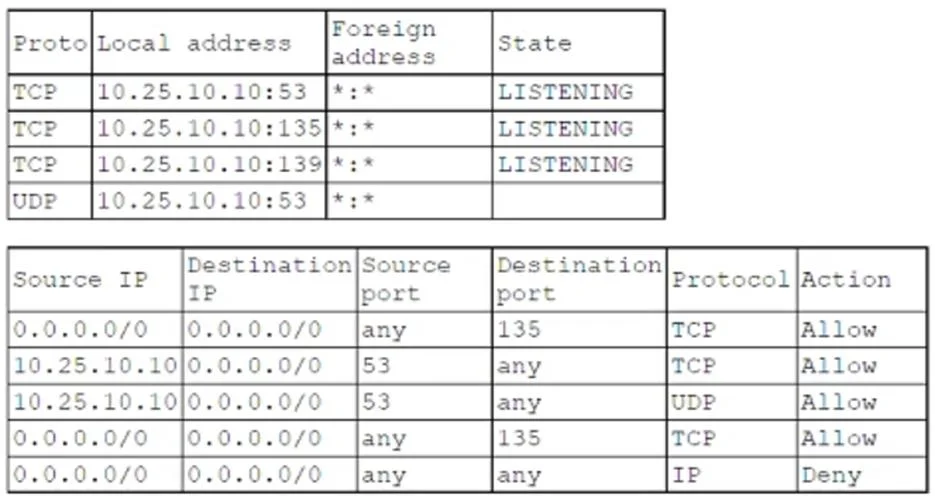
A technician deployed a new DNS server but reports that it is not responding to queries. The following information was included in the ticket: Which of the following changes will correct the issue?
The correct answer is B. Modifying the firewall rules. Based on the information in the image, the firewall rules show that traffic for DNS over TCP (port 53) is allowed, but UDP port 53, which is commonly used for DNS queries, does not seem to have an explicit allow rule. DNS typically uses UDP on port 53 for queries, and although…
Question
A technician deployed a new DNS server but reports that it is not responding to queries. The following information was included in the ticket:
Which of the following changes will correct the issue?
Exhibit
Options
- AChanging the DNS port on the server
- BModifying the firewall rules
- CStarting the DNS service
- DChanging the IP address of the server
How the community answered
(16 responses)- A6% (1)
- B75% (12)
- C13% (2)
- D6% (1)
Explanation
Based on the information in the image, the firewall rules show that traffic for DNS over TCP (port 53) is allowed, but UDP port 53, which is commonly used for DNS queries, does not seem to have an explicit allow rule. DNS typically uses UDP on port 53 for queries, and although TCP is sometimes used (e.g., for larger responses or zone transfers), the primary protocol for DNS queries is UDP. Since the firewall rules in the image are allowing TCP traffic on port 53 but not explicitly allowing UDP traffic, the correct course of action would be Modifying the firewall rules. To fix the issue, the firewall needs to explicitly allow UDP traffic on port 53, ensuring that DNS queries can be processed properly.
Topics
Community Discussion
No community discussion yet for this question.