
SC-401 · Question #192
Drag and Drop Question You have a Microsoft 365 5 subscription that uses Microsoft Purview insider risk management and contains three users named User1, User2, and User3. All insider risk management…
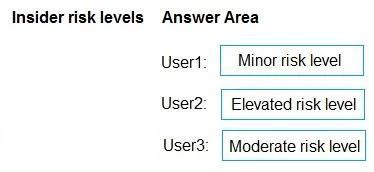
The correct answer is Minor risk level; Elevated risk level; Moderate risk level. This question assesses understanding of Microsoft Purview Insider Risk Management's adaptive protection and how default conditions assign risk levels based on the frequency and severity of user activities.
Question
Exhibits
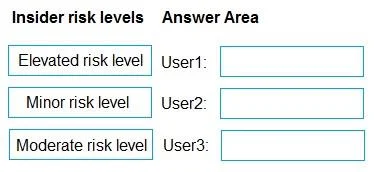
Answer Area
Drag items
Correct arrangement
- Minor risk level
- Elevated risk level
- Moderate risk level
Explanation
This question assesses understanding of Microsoft Purview Insider Risk Management's adaptive protection and how default conditions assign risk levels based on the frequency and severity of user activities.
Approach. The correct interaction is to drag 'Minor risk level' to User1, 'Elevated risk level' to User2, and 'Moderate risk level' to User3. This assignment is based on the default behavior of adaptive protection in Microsoft Purview Insider Risk Management:
- User1: 'at least one data exfiltration activity that results in a high severity risk score.' A single high-severity incident typically triggers a 'Minor risk level' as an initial alert or first instance of concerning activity. Adaptive protection starts with a lower level for individual events.
- User2: 'at least three risky user activities within seven days, that each results in a high severity risk score.' Three high-severity activities in a short timeframe (seven days) indicate a significant, repeated, or escalating pattern of risky behavior, warranting the highest 'Elevated risk level'.
- User3: 'at least two data exfiltration activities within seven days, that each results in a high severity risk score.' Two high-severity data exfiltration activities within seven days represent a more persistent or significant pattern than a single event, but not as frequent as three activities, placing it in the 'Moderate risk level'.
Common mistakes.
- common_mistake. Common mistakes include misinterpreting the escalation of risk. For instance, assigning 'Elevated' to User1 is incorrect because a single high-severity activity typically doesn't immediately lead to the highest risk level under default conditions. Assigning 'Minor' to User2 or User3 is wrong because multiple high-severity activities within a week (two or three) clearly represent more than a minor or initial risk, indicating a pattern requiring higher scrutiny. Swapping 'Moderate' and 'Elevated' between User2 and User3 is incorrect because User2 has more high-severity activities (three) than User3 (two) within the same timeframe, making User2's risk definitively higher and thus 'Elevated' compared to User3's 'Moderate'.
Concept tested. Microsoft Purview Insider Risk Management - Adaptive Protection, default conditions for risk level assignment (Minor, Moderate, Elevated), and the correlation between the frequency and severity of risky user activities with these assigned risk levels.
Topics
Community Discussion
No community discussion yet for this question.