
SC-300 · Question #83
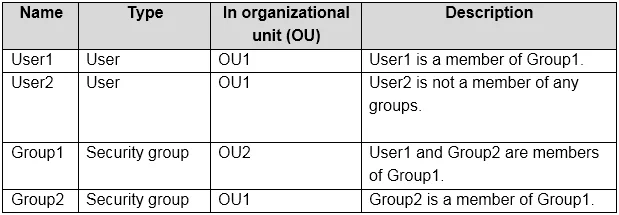
Hotspot Question Your network contains an on-premises Active Directory domain named contoso.com. The domain contains the objects shown in the following table. You install Azure AD Connect. You…
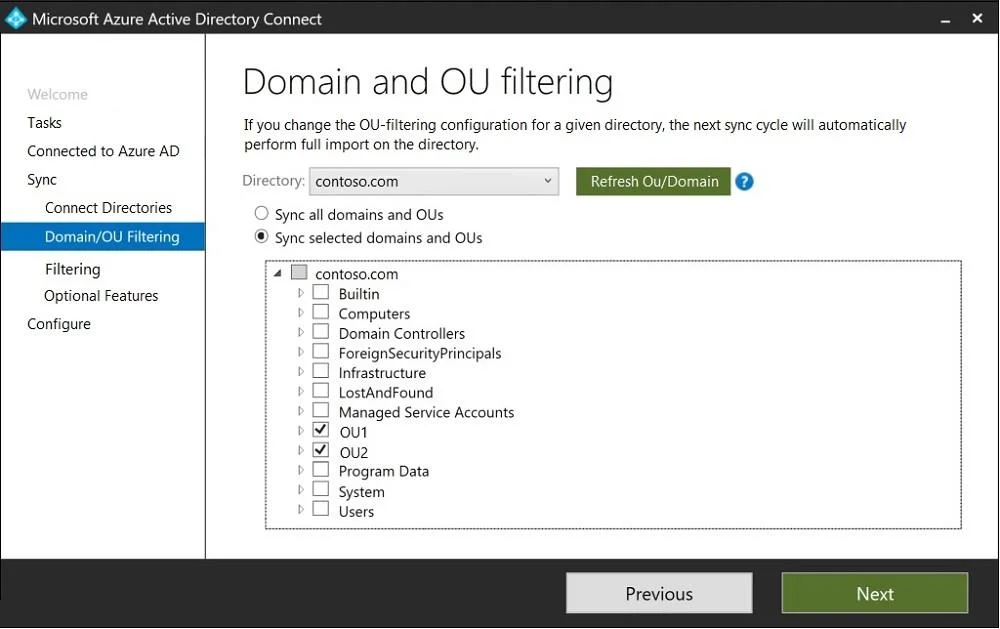
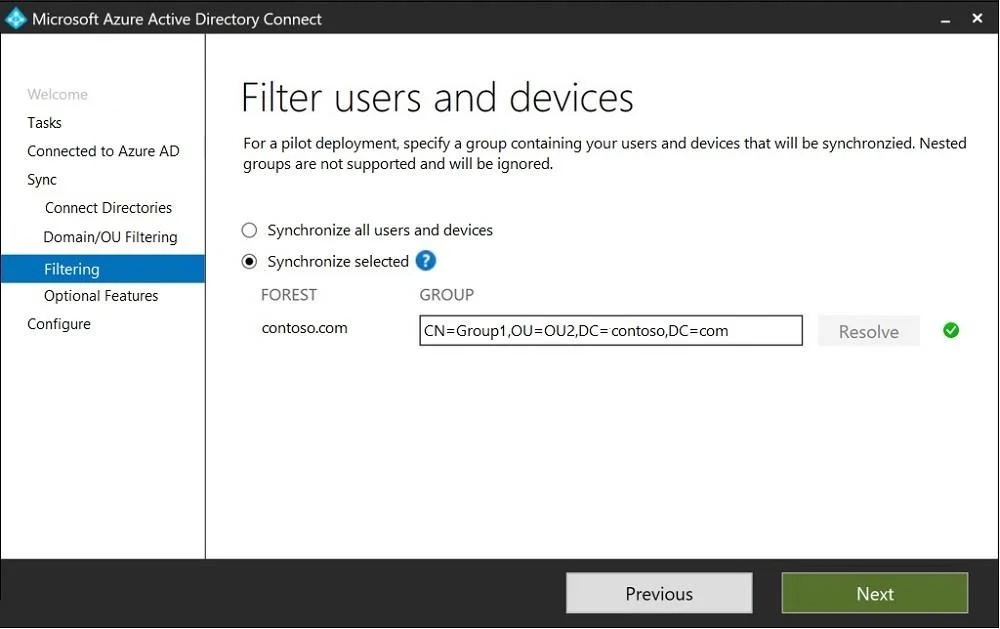
The correct answer is Sync all domains and OUs = No; Sync selected domains and OUs = Yes; contoso.com = Yes; Builtin = No; Computers = No; Domain Controllers = No; ForeignSecurityPrincipals = No; Infrastructure = No; LostAndFound = No; Managed Service Accounts = No; OU1 = Yes; OU2 = Yes; Program Data = No; System = No; Users = No. This question tests knowledge of Azure AD Connect synchronization filtering, specifically how Domain/OU filtering and Group-based (Filter users and devices) filtering interact to determine which on-premises objects get synchronized to Azure AD.
Question
Exhibits
Answer Area
- Sync all domains and OUsNo
- Sync selected domains and OUsYes
- contoso.comYes
- BuiltinNo
- ComputersNo
- Domain ControllersNo
- ForeignSecurityPrincipalsNo
- InfrastructureNo
- LostAndFoundNo
- Managed Service AccountsNo
- OU1Yes
- OU2Yes
- Program DataNo
- SystemNo
- UsersNo
Explanation
This question tests knowledge of Azure AD Connect synchronization filtering, specifically how Domain/OU filtering and Group-based (Filter users and devices) filtering interact to determine which on-premises objects get synchronized to Azure AD.
Approach. Azure AD Connect uses a combination of OU filtering and group-based filtering to determine what synchronizes. When Domain/OU filtering is configured, only objects within selected OUs are in scope. When 'Filter users and devices' (group-based filtering) is enabled, ONLY members of the specified group are synchronized - this applies on TOP of OU filtering. A user must satisfy BOTH conditions: (1) be in a synchronized OU AND (2) be a member of the sync group (if group filtering is enabled). Computer objects and other non-user/device objects like contacts follow OU filtering only; group-based filtering applies only to users and devices. If an OU is deselected in Domain/OU filtering, NO objects from that OU sync regardless of group membership. If group-based filtering is enabled, users NOT in the specified group will NOT sync even if their OU is selected.
Concept tested. Azure AD Connect filtering mechanisms: the interaction between Domain/OU filtering and group-based (Filter users and devices) filtering, and how these two layers combine to determine which Active Directory objects (users, computers, groups, contacts) are synchronized to Azure AD.
Topics
Community Discussion
No community discussion yet for this question.