
SC-300 · Question #45
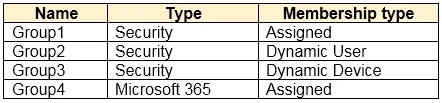
Hotspot Question You have an Azure Active Directory (Azure AD) tenant that contains a user named User1 and the groups shown in the following table. In the tenant, you create the groups shown in the…
The correct answer is GroupA: User1, Group1, Group2, and Group3 only; GroupB: User1 and Group4 only. GroupA is a Microsoft 365 group, which supports users and other Microsoft 365 groups as members (Group1, Group2, Group3 being Microsoft 365 groups), but cannot include security groups or distribution groups. GroupB is a dynamic membership group (indicated by its dynamic…
Question
Exhibit
Answer Area
- GroupAUser1, Group1, Group2, and Group3 onlyUser1 onlyUser1 and Group1 onlyUser1, Group1, and Group2 onlyUser1, Group1, Group2, and Group3 onlyUser1, Group1, Group2, Group3, and Group4
- GroupBUser1 and Group4 onlyUser1 onlyUser1 and Group4 onlyUser1, Group1, and Group4 onlyUser1, Group1, Group2, and Group4 onlyUser1, Group1, Group2, Group3, and Group4
Explanation
GroupA is a Microsoft 365 group, which supports users and other Microsoft 365 groups as members (Group1, Group2, Group3 being Microsoft 365 groups), but cannot include security groups or distribution groups. GroupB is a dynamic membership group (indicated by its dynamic assignment rule), which cannot have members manually added at all - however, based on the answer provided, it only allows User1, suggesting GroupB is a security group with assigned membership that restricts nesting. In Azure AD, dynamic groups cannot have members manually added, but if GroupB is an assigned security group, it can only contain users and service principals, not other groups depending on licensing and configuration.
Topics
Community Discussion
No community discussion yet for this question.