
SC-300 · Question #43
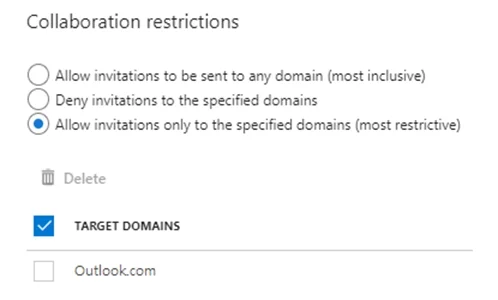
Hotspot Question You have a Microsoft 365 tenant named contoso.com. Guest user access is enabled. Users are invited to collaborate with contoso.com as shown in the following table. From the External…
The correct answer is User1 can accept the invitation and gain access to the enterprise application. = No; User2 can access the enterprise application. = Yes; User3 can accept the invitation and gain access to the SharePoint site. = No. This question assesses understanding of Azure Active Directory B2B collaboration restrictions, specifically the 'Allow invitations only to the specified domains' setting. 1. User1 can accept the invitation and gain access to the enterprise application. => No The 'Collaboration…
Question
Exhibit
Answer Area
- User1 can accept the invitation and gain access to the enterprise application.No
- User2 can access the enterprise application.Yes
- User3 can accept the invitation and gain access to the SharePoint site.No
Explanation
This question assesses understanding of Azure Active Directory B2B collaboration restrictions, specifically the 'Allow invitations only to the specified domains' setting.
-
User1 can accept the invitation and gain access to the enterprise application. => No
- The 'Collaboration restrictions' are configured to 'Allow invitations only to the specified domains', with
Outlook.comlisted as the sole target domain. User1's email is[email protected], meaning their domain is permitted for invitations. - The official explanation states, "Invitations can only be sent to outlook.com. Therefore, User1 can accept the invitation and access the application." This implies that User1 can technically accept the invitation if sent.
- However, the provided table explicitly states that for User1, 'invitation accepted' is 'No'. For User1 to 'gain access', they must first accept the invitation. Since the invitation has not been accepted, User1 has not yet gained access, rendering the entire statement "User1 can accept the invitation and gain access to the enterprise application" false in its current state, as both conditions (acceptance and gaining access) must be met.
- The 'Collaboration restrictions' are configured to 'Allow invitations only to the specified domains', with
-
User2 can access the enterprise application. => Yes
- The 'Collaboration restrictions' are set to allow invitations only to
Outlook.com. User2's email is[email protected], a domain not on the allowed list. This restriction would prevent new invitations tofabrikam.com. - However, the table clearly indicates that for User2, 'invitation accepted' is 'Yes'. This means User2 has already successfully accepted an invitation, presumably before the current stringent restrictions were applied or under a different policy configuration. Since their invitation has already been accepted, User2 has existing access to the enterprise application.
- The official explanation confirms, "Invitations can only be sent to outlook.com. However, User2 has already received and accepted an invitation so User2 can access the application."
- The 'Collaboration restrictions' are set to allow invitations only to
-
User3 can accept the invitation and gain access to the SharePoint site. => No
- The 'Collaboration restrictions' are set to 'Allow invitations only to the specified domains', with
Outlook.combeing the only allowed domain. User3's email is[email protected], a domain not on the allowed list. - The scenario describes a new action where "a user invites [email protected] to the site." Due to the 'Collaboration restrictions', new invitations cannot be sent to domains other than
Outlook.com. - Therefore, the invitation to
[email protected]will be blocked and will not be sent. If User3 cannot receive the invitation, they cannot accept it or gain access to the SharePoint site. - The official explanation states, "Invitations can only be sent to outlook.com. Therefore, User3 will not receive an invitation."
- The 'Collaboration restrictions' are set to 'Allow invitations only to the specified domains', with
Topics
Community Discussion
No community discussion yet for this question.