
SC-300 · Question #391
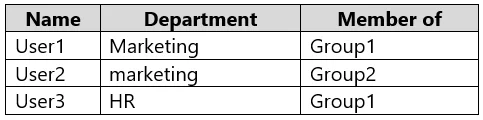
Hotspot Question You have a Microsoft 365 E5 subscription that contains two groups named Group1 and Group2 and the users shown in the following table. Group2 is a member of Group1. You configure…
The correct answer is User1 will be provisioned in the Microsoft Entra tenant of fabrikam.com. = Yes; User2 will be provisioned in the Microsoft Entra tenant of fabrikam.com. = No; User3 will be provisioned in the Microsoft Entra tenant of fabrikam.com. = No. Cross-tenant synchronization provisions users who are both assigned (directly or via group membership) AND match the scoping filter. User1 is in Group1 (directly) and is in the Marketing department, satisfying both conditions - so User1 is provisioned (Yes). User2 is in Group2…
Question
Exhibit
Answer Area
- User1 will be provisioned in the Microsoft Entra tenant of fabrikam.com.Yes
- User2 will be provisioned in the Microsoft Entra tenant of fabrikam.com.No
- User3 will be provisioned in the Microsoft Entra tenant of fabrikam.com.No
Explanation
Cross-tenant synchronization provisions users who are both assigned (directly or via group membership) AND match the scoping filter. User1 is in Group1 (directly) and is in the Marketing department, satisfying both conditions - so User1 is provisioned (Yes). User2 is in Group2, which is a member of Group1 (nested membership), but cross-tenant synchronization does NOT support nested/transitive group membership for scoping - only direct members of the assigned group are considered - additionally, if User2 is not in Marketing, the scoping filter would also exclude them; either reason alone disqualifies User2 (No). User3 may be in Group1 but if their Department does not equal Marketing, the scoping filter excludes them from provisioning (No).
Topics
Community Discussion
No community discussion yet for this question.