
SC-300 · Question #386
Hotspot Question You have a Microsoft Entra tenant that contains the identities shown in the following table. Group1 has the following configurations: - Owners: User1, User4 - Members: User1…
The correct answer is User3 can perform an access review of User1. = Yes; User3 can perform an access review of User4. = No; User3 can perform an access review of User5. = Yes. Access Review Analysis - Review1 Setup Summary | Element | Value | |---|---| | Reviewed group | Group1 | | Group1 Owners | User1, User4 | | Group1 Members | User1, Managed2, Group2 (nested) | | Reviewers setting | Group owner(s) | | Fallback reviewers | None | Key inferences…
Question
Hotspot Question You have a Microsoft Entra tenant that contains the identities shown in the following table. Group1 has the following configurations:
- Owners: User1, User4
- Members: User1, Managed2, Group2
You create an access review that has the following settings:
- Name: Review1
- Review scope: Select Teams + Groups
- Group: Group1
- Scope: All users
- Select reviewers: Group owner(s)
The Fallback reviewers setting is NOT configured. For each of the following statements, select Yes if the statement is true. Otherwise, select No. NOTE: Each correct selection is worth one point. Answer:
Exhibit
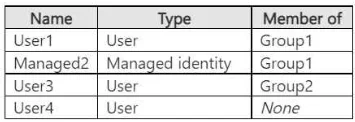
Answer Area
- User3 can perform an access review of User1.Yes
- User3 can perform an access review of User4.No
- User3 can perform an access review of User5.Yes
Explanation
Access Review Analysis - Review1
Setup Summary
| Element | Value |
|---|---|
| Reviewed group | Group1 |
| Group1 Owners | User1, User4 |
| Group1 Members | User1, Managed2, Group2 (nested) |
| Reviewers setting | Group owner(s) |
| Fallback reviewers | None |
Key inferences from the statements (the identity table isn't shown, but we can derive):
- User3 is an owner of Group2 (nested inside Group1) and a direct member of Group1
- User5 is a member of Group2
- User4 is an owner of Group1 but not a member
Reviewer Assignment Logic
When reviewer type is "Group owner(s)":
- Group1 owners (User1, User4) review Group1's direct members
- Nested group owners review their own group's members - so Group2's owner (User3) reviews Group2's members
Statement-by-Statement Breakdown
1. User3 can perform an access review of User1 -> No
User1 is a direct member of Group1, so they are reviewed by Group1's owners (User1, User4). User3 is the owner of the nested Group2 - that role only grants review rights over Group2's members, not Group1's direct members.
2. User3 can perform an access review of User4 -> No
User4 is an owner of Group1, but is not listed as a member. The review scope covers members, not owners. Since User4 is not in scope, no one can review User4 - not User3, not anyone.
Key concept: Being an owner does NOT automatically make you a reviewable member.
3. User3 can perform an access review of User5 -> Yes
User5 is a member of Group2 (the nested group). User3 owns Group2. Microsoft Entra assigns the nested group's owners as reviewers for that group's members, so User3 has review rights over User5.
Key concept: Nested group owners act as reviewers for their group's members within the parent review.
4. User1 can perform an access review for User1 -> Yes
User1 is both an owner and a member of Group1. Microsoft Entra access reviews allow self-review - a reviewer who is also in scope can review their own access. This is by design and is the default behavior unless explicitly disabled.
Key concept: Self-review is permitted in Entra access reviews.
5. User1 can perform an access review for Managed2 -> Yes
Managed2 is a direct member of Group1. User1 is a Group1 owner. Group1 owners review all direct members of Group1, including managed identities. The reviewer assignment does not exclude non-user account types.
6. User1 can perform an access review for User3 -> Yes
User3 is a direct member of Group1 (in addition to owning Group2). As a Group1 owner, User1 has review rights over all direct members of Group1 - including User3. User3's ownership of Group2 is irrelevant here; what matters is that User3 is in scope as a direct Group1 member.
Memory Tips
Owner ≠ Member - Always check the Members list separately from the Owners list. Owners outside the Members list are invisible to the review.
Nested group = separate reviewer chain - Think of it as "each group's owners handle their own members." The parent group's owners don't review nested-group members; the nested group's owners do.
The review scope determines who gets reviewed; the reviewer setting determines who does the reviewing. These two dimensions are independent - map them separately before answering.
Topics
Community Discussion
No community discussion yet for this question.