
SC-300 · Question #364
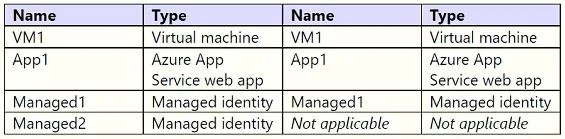
Hotspot Question You have an Azure subscription that contains the resources shown in the following table. You create a Microsoft Entra user named User1. Which identities can you add to VM1 and App1?…
The correct answer is Can add User1 to VM1? = No; Can add Managed1 to VM1? = Yes; Can add Managed2 to VM1? = Yes; Can add User1 to App1? = No; Can add Managed1 to App1? = Yes; Can add Managed2 to App1? = Yes. Azure Managed Identities - Hotspot Explanation > Note: The question table isn't fully shown, but this question follows a standard AZ-104 pattern. I'll explain based on the typical setup: > - VM1 = Azure Virtual Machine > - App1 = Azure App Service > - Managed1 = System-assigned…
Question
Hotspot Question You have an Azure subscription that contains the resources shown in the following table. You create a Microsoft Entra user named User1. Which identities can you add to VM1 and App1? To answer, select the appropriate options in the answer area. NOTE: Each correct answer is worth one point. Answer:
Exhibit
Answer Area
- Can add User1 to VM1?No
- Can add Managed1 to VM1?Yes
- Can add Managed2 to VM1?Yes
- Can add User1 to App1?No
- Can add Managed1 to App1?Yes
- Can add Managed2 to App1?Yes
Explanation
Azure Managed Identities - Hotspot Explanation
Note: The question table isn't fully shown, but this question follows a standard AZ-104 pattern. I'll explain based on the typical setup:
- VM1 = Azure Virtual Machine
- App1 = Azure App Service
- Managed1 = System-assigned managed identity
- Managed2 = User-assigned managed identity
- User1 = Microsoft Entra user
Key Concepts First
| Identity Type | Tied To | Assignable To Multiple Resources? |
|---|---|---|
| Entra User | Human/directory | No (it's a person, not a resource identity) |
| System-assigned MI | One specific resource | No (1:1 relationship) |
| User-assigned MI | Standalone resource | Yes (many:many) |
Statement-by-Statement Breakdown
1. Can add User1 to VM1? -> No
A VM's "identity" means a managed identity used for Azure authentication (e.g., to access Key Vault). Entra users are human directory accounts - they cannot be assigned as the identity of a VM. You can give User1 RBAC access to the VM, but that's different from being the VM's identity.
2. Can add Managed1 (System-assigned) to VM1? -> No
System-assigned managed identities have a strict 1:1 lifecycle with their host resource. Managed1 was created for and bound to another resource - you cannot detach and re-assign it to VM1. If VM1 needs a system-assigned identity, one must be created directly on VM1.
3. Can add Managed2 (User-assigned) to VM1? -> Yes
User-assigned managed identities are independent, standalone resources in Azure. They can be assigned to multiple resources simultaneously - VMs, App Services, Function Apps, etc. This is their primary advantage over system-assigned.
4. Can add User1 to App1? -> No
Same reasoning as #1. An App Service's managed identity is not a directory user. You cannot assign a human Entra account as the application's identity for service-to-service auth.
5. Can add Managed1 (System-assigned) to App1? -> No
Same reasoning as #2. System-assigned = bound to exactly one resource. It cannot be shared with App1.
6. Can add Managed2 (User-assigned) to App1? -> Yes
Same reasoning as #3. User-assigned managed identities are reusable. The same Managed2 identity can simultaneously be assigned to both VM1 and App1.
Memory Tip
"System = Solitary, User = Universal"
- System-assigned = Stuck to one resource (deleted when resource is deleted)
- User-assigned = Universal - assign to many resources, survives resource deletion
Think of it like an employee badge:
- System-assigned = badge printed with your name on it (only works for you, shredded when you leave)
- User-assigned = shared department badge (anyone on the team can use it, survives staff changes)
Topics
Community Discussion
No community discussion yet for this question.