
SC-300 · Question #334
SIMULATION Use the following login credentials as needed: To enter your username, place your cursor in the Sign in box and click on the username below. To enter your password, place your cursor in…
The correct solution uses Microsoft Entra Conditional Access to create a targeted MFA policy that applies exclusively to the Executives group when accessing Microsoft Office 365 apps. Conditional Access is the proper tool because it allows granular, group-scoped policy…
Question
SIMULATION Use the following login credentials as needed:
To enter your username, place your cursor in the Sign in box and click on the username below. To enter your password, place your cursor in the Enter password box and click on the password below. Microsoft 365 Username:[email protected] Microsoft 365 Password: =1122334455667788 If the Microsoft 365 portal does not load successfully in the browser, press CTRL-K to reload the portal in a new browser tab. The following information is for technical support purposes only:
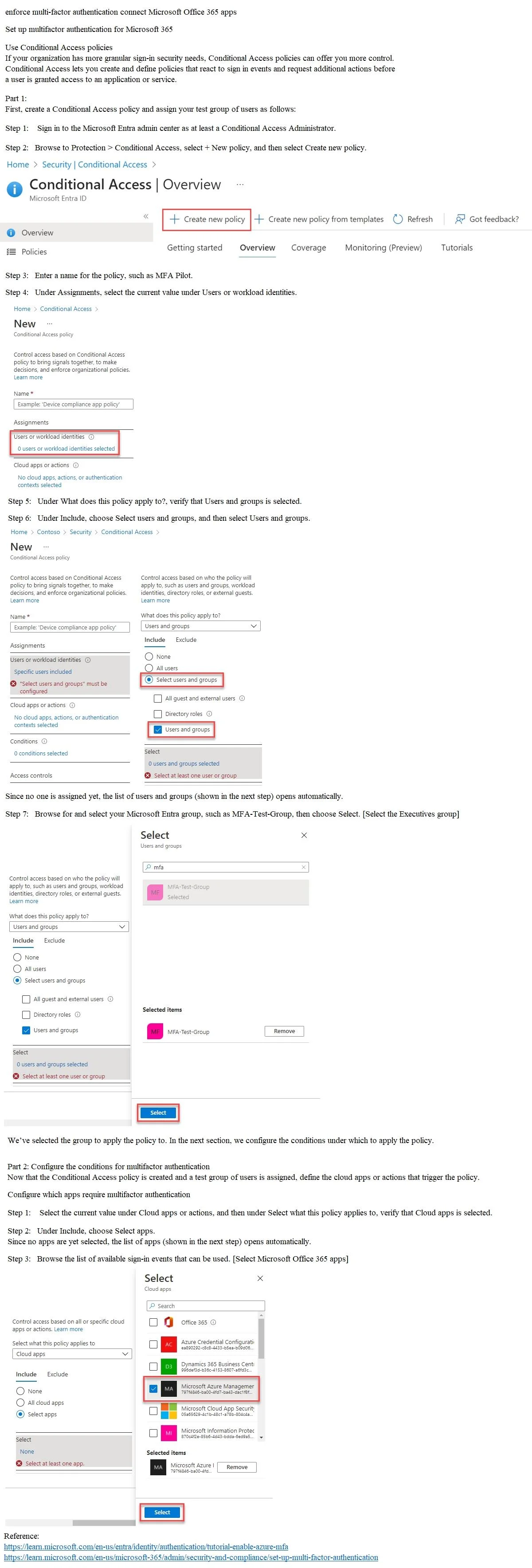
Lab Instance: 99999999 You need to enforce multi-factor authentication (MFA) for users in the Executives group when they connect to Microsoft Office 365 apps. The solution must affect only the users in the Executives group. To complete this task, sign in to the appropriate admin center. Answer:
Exhibit
Explanation
The correct solution uses Microsoft Entra Conditional Access to create a targeted MFA policy that applies exclusively to the Executives group when accessing Microsoft Office 365 apps. Conditional Access is the proper tool because it allows granular, group-scoped policy enforcement - you assign the policy to only the 'Executives' group under Assignments > Users, select 'Office 365' under Cloud apps, and set 'Require multifactor authentication' as the Grant control. This is superior to per-user MFA or Security Defaults because those methods cannot be scoped to a single group without affecting other users or the entire tenant.
Topics
Community Discussion
No community discussion yet for this question.