
SC-300 · Question #324
Hotspot Question You have an Azure subscription named Sub1 that contains three users named User1, User2, and User3. Sub1 has a storage account named storage1 that contains the resources shown in the…
The correct answer is Users who can read File1:: User2 and User3; Users who can read File2:: User2 and User3. This question tests understanding of Azure RBAC roles, their scopes, the distinction between management plane and data plane access, and the nuanced effect of the 'Storage Contributor' role allowing access to storage account keys, which in turn grants full data access across…
Question
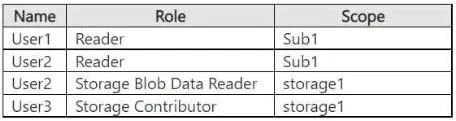
Hotspot Question You have an Azure subscription named Sub1 that contains three users named User1, User2, and User3. Sub1 has a storage account named storage1 that contains the resources shown in the following table. Sub1 contains the users shown in the following table. Which users can read File1, and which users can read File2? To answer, select the appropriate options in the answer area. NOTE: Each correct selection is worth one point. Answer:
Exhibit
Answer Area
- Users who can read File1:User2 and User3User1User2User3User1 and User2User1 and User3User2 and User3User1, User2, and User3None
- Users who can read File2:User2 and User3User1User2User3User1 and User2User1 and User3User2 and User3User1, User2, and User3None
Explanation
This question tests understanding of Azure RBAC roles, their scopes, the distinction between management plane and data plane access, and the nuanced effect of the 'Storage Contributor' role allowing access to storage account keys, which in turn grants full data access across different storage service types.
Approach. The core of this problem lies in understanding the specific permissions granted by each role, their scope, and the critical distinction between management plane and data plane access for different types of storage resources. The question implies that 'File1' and 'File2' are resources within 'storage1'. To arrive at the correct answer (as shown in the highlighted options), we must infer that 'File1' is a blob and 'File2' is an Azure File Share file.
Analysis for each user's ability to read data within 'storage1':
-
User1 (Reader on Sub1): The 'Reader' role at the subscription level only grants permission to view management plane resources and their properties. It does not grant access to the actual data (blobs, files, tables, queues) stored within a storage account. Therefore, User1 cannot read File1 or File2.
-
User2 (Storage Blob Data Reader on storage1): This is a data plane role specifically designed to grant read access to blob data within the specified scope ('storage1').
- Can read File1 (Blob)? YES. The 'Storage Blob Data Reader' role directly allows reading blobs.
- Can read File2 (Azure File Share file)? NO. This role is specific to blobs and does not provide access to Azure File Share data. To read Azure Files, a different data plane role (e.g., 'Storage File Data SMB Share Reader') would be needed.
-
User3 (Storage Contributor on storage1): This is a management plane role that grants full management access to the storage account itself. Crucially, the 'Storage Contributor' role includes the
Microsoft.Storage/storageAccounts/listKeys/actionpermission. This allows User3 to retrieve the storage account access keys. Once User3 has the storage account keys, they gain full administrative access to all data across all storage services within that storage account (blobs, files, tables, queues), effectively bypassing standard RBAC data plane roles for data access.- Can read File1 (Blob)? YES. Via storage account keys.
- Can read File2 (Azure File Share file)? YES. Via storage account keys.
Applying this to the files:
- For File1 (inferred as a blob): Both User2 (via 'Storage Blob Data Reader') and User3 (via 'Storage Contributor' and its 'listKeys' permission) can read it. Thus, the correct selection for File1 is 'User2 and User3 only'.
- For File2 (inferred as an Azure File Share file): User2 cannot read it (because 'Storage Blob Data Reader' is blob-specific). User3 can read it (via 'Storage Contributor' and its 'listKeys' permission). Thus, the correct selection for File2 is 'User3 only'.
Common mistakes.
- common_mistake. Common mistakes include:
- Assuming 'Reader' role provides data access: A 'Reader' role at the subscription or resource group level only grants management plane read permissions (e.g., viewing resource properties) and does not inherently allow access to data within storage accounts.
- Misinterpreting 'Storage Contributor': Many might incorrectly assume 'Storage Contributor' is purely a management plane role and does not grant data access. However, because it includes the 'listKeys' permission, it provides an indirect but effective way to gain full data access, which is often tested in exams.
- Assuming data plane roles are universal: Incorrectly thinking that 'Storage Blob Data Reader' grants access to all types of storage data (e.g., blobs and Azure Files) within a storage account, when in fact, it is specific to blobs.
- Not differentiating File1 and File2: Without inferring that File1 and File2 represent different types of storage (e.g., blob vs. file share), the access patterns for User2 would appear inconsistent, leading to confusion and incorrect answers.
Concept tested. The underlying technical concepts tested are:
- Azure Role-Based Access Control (RBAC): Understanding how roles and scopes determine permissions.
- Management Plane vs. Data Plane Roles: The critical distinction between roles that manage Azure resources (e.g., Reader, Contributor, Storage Contributor) and roles that grant access to data within those resources (e.g., Storage Blob Data Reader).
- Permissions of 'Storage Contributor': Specifically, the understanding that the
Microsoft.Storage/storageAccounts/listKeys/actionpermission within 'Storage Contributor' allows a user to retrieve storage account access keys, which grant full data access to all storage services (blobs, files, queues, tables) within that account. - Specificity of Data Plane Roles: Recognizing that roles like 'Storage Blob Data Reader' are specific to certain storage services (e.g., blobs) and do not automatically extend to other services (e.g., Azure Files).
- Implicit vs. Explicit Access: Understanding that data access can be granted explicitly through data plane RBAC roles or implicitly through management plane roles that expose credentials (like storage account keys).
Topics
Community Discussion
No community discussion yet for this question.