
SC-300 · Question #313
SIMULATION Use the following login credentials as needed: To enter your username, place your cursor in the Sign in box and click on the username below. To enter your password, place your cursor in…
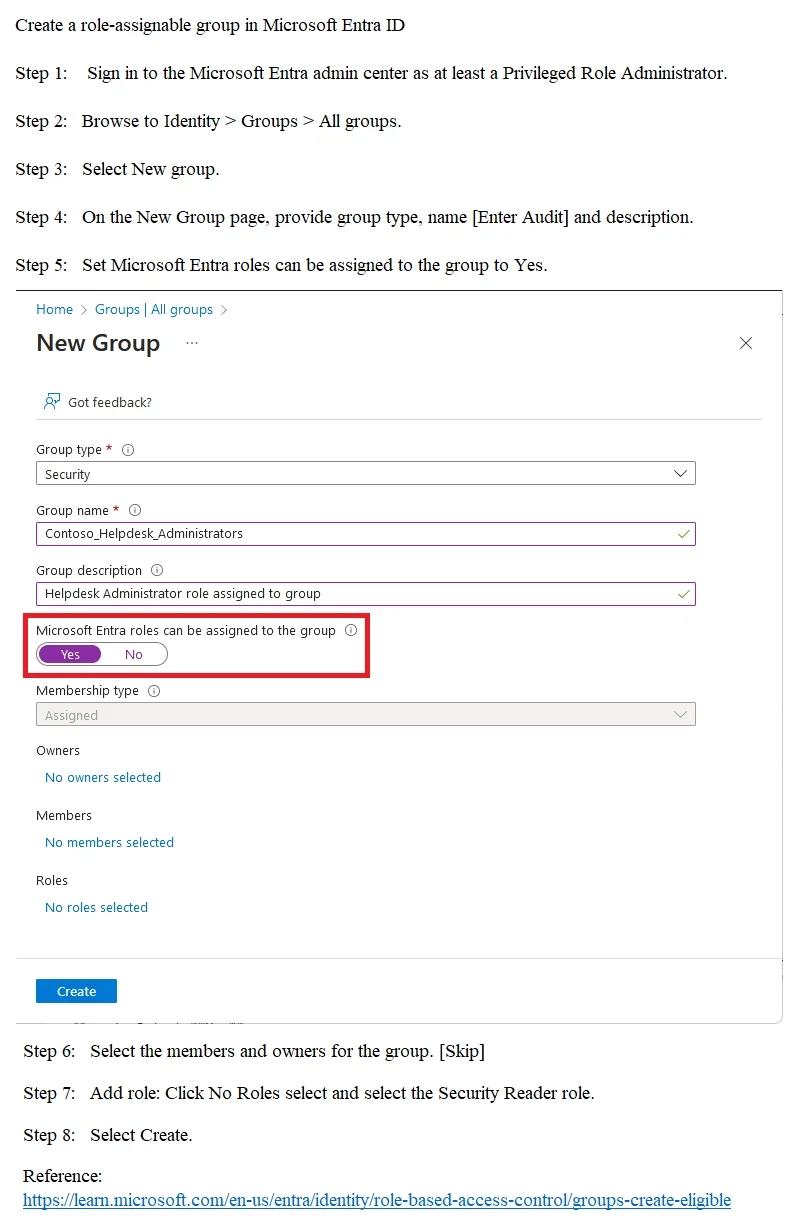
The correct solution requires creating a role-assignable group in Microsoft Entra ID by enabling the 'Microsoft Entra roles can be assigned to the group' toggle during group creation, which is a one-time setting that cannot be changed after the group is created. Once the group…
Question
SIMULATION Use the following login credentials as needed:
To enter your username, place your cursor in the Sign in box and click on the username below. To enter your password, place your cursor in the Enter password box and click on the password below. Microsoft 365 Username:[email protected] Microsoft 365 Password: =1122334455667788 If the Microsoft 365 portal does not load successfully in the browser, press CTRL-K to reload the portal in a new browser tab. The following information is for technical support purposes only:
Lab Instance: 99999999 You need to create a group named Audit. The solution must ensure that the members of Audit can activate the Security Reader role. To complete this task, sign in to the appropriate admin center. Answer:
Exhibit
Explanation
The correct solution requires creating a role-assignable group in Microsoft Entra ID by enabling the 'Microsoft Entra roles can be assigned to the group' toggle during group creation, which is a one-time setting that cannot be changed after the group is created. Once the group 'Audit' is created as role-assignable, you can then assign the Security Reader role to the group through Privileged Identity Management (PIM) as an eligible assignment, allowing members to activate the role when needed. This approach leverages PIM's just-in-time access model, meaning members must explicitly activate the Security Reader role rather than having it permanently assigned, which satisfies the requirement that members 'can activate' the role.
Topics
Community Discussion
No community discussion yet for this question.