
SC-300 · Question #299
Drag and Drop Question Your network contains an on-premises Active Directory domain named contoso.com that syncs with Microsoft Entra ID by using Microsoft Entra Connect. The domain contains the…
The correct answer is A. the Licenses blade in the Microsoft Entra admin center. The question as presented appears to be a mismatch between the drag-and-drop scenario (about Microsoft Entra Connect sync statuses) and the answer options provided (which relate to managing users/licenses in Entra). Taking the correct answer at face value (Option A: the…
Question
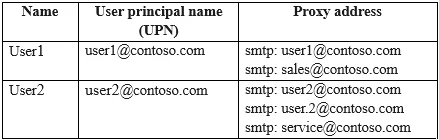
Drag and Drop Question Your network contains an on-premises Active Directory domain named contoso.com that syncs with Microsoft Entra ID by using Microsoft Entra Connect. The domain contains the users shown in the following table. From Active Directory Users and Computers, you add the following user:
- Name: User3
- UPN: [email protected]
- Proxy addresses: smtp: [email protected], smtp: [email protected]
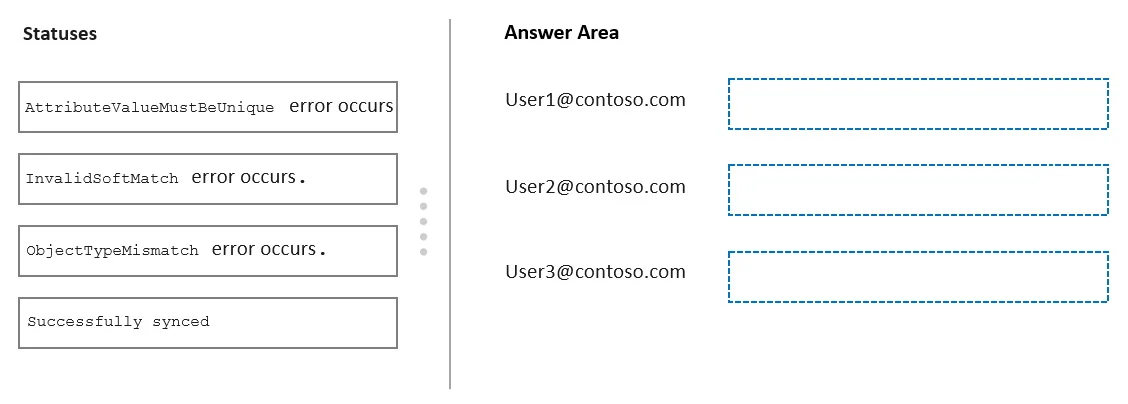
From Active Directory Users and Computers, you update the proxyAddresses attribute for each user as shown in the following table. You trigger a manual synchronization. Which sync status will Microsoft Entra Connect sync return for each user? To answer, drag the appropriate status to the correct users. Each status may be used once, more than once, or not at all. You may need to drag the split bar between panes or scroll to view content. NOTE: Each correct selection is worth one point. Answer:
Exhibits
Options
- Athe Licenses blade in the Microsoft Entra admin center
- Bthe Administrative units blade in the Microsoft Entra admin center
- Cthe Identity Governance blade in the Microsoft Entra admin center
- Dthe Update-MgUser cmdlet
How the community answered
(42 responses)- A57% (24)
- B12% (5)
- C7% (3)
- D24% (10)
Explanation
The question as presented appears to be a mismatch between the drag-and-drop scenario (about Microsoft Entra Connect sync statuses) and the answer options provided (which relate to managing users/licenses in Entra). Taking the correct answer at face value (Option A: the Licenses blade in the Microsoft Entra admin center), this blade is the appropriate location to view and manage per-user license assignments, including sync-related license conflicts that may arise when duplicate proxy addresses or UPN conflicts occur during synchronization. The Licenses blade surfaces errors and assignment statuses that result from synchronization issues such as duplicate proxyAddresses attributes.
Topics
Community Discussion
No community discussion yet for this question.