
SC-300 · Question #259
You have an Azure AD tenant that contains the external user shown in the following exhibit. You update the email address of the user. You need to ensure that the user can authenticate by using the…
The correct answer is D. Reset the redemption status. https://learn.microsoft.com/en-us/entra/external-id/reset-redemption-status Update the guest user's sign-in information after they've redeemed your invitation for B2B collaboration. There might be times when you'll need to update their sign-in information, for - The user wants…
Question
You have an Azure AD tenant that contains the external user shown in the following exhibit. You update the email address of the user. You need to ensure that the user can authenticate by using the updated email address. What should you do for the user?
Exhibit
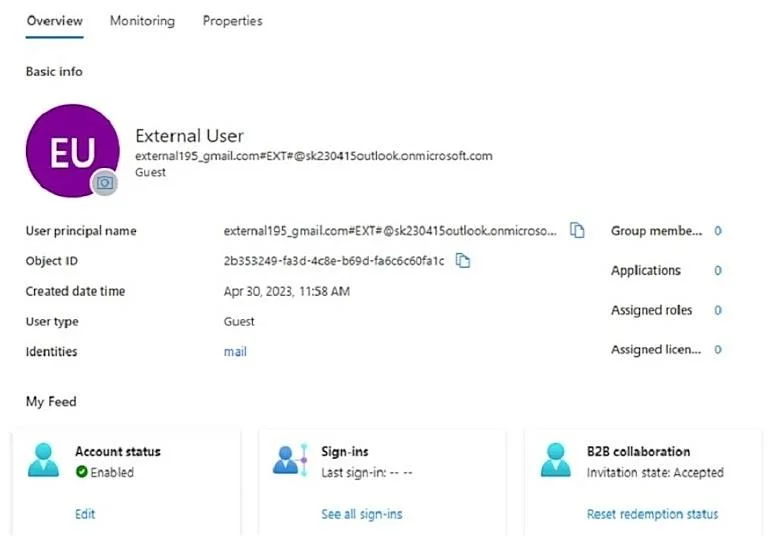
Options
- AModify the Authentication methods settings.
- BReset the password.
- CRevoke the active sessions.
- DReset the redemption status.
How the community answered
(27 responses)- A15% (4)
- B7% (2)
- C4% (1)
- D74% (20)
Explanation
https://learn.microsoft.com/en-us/entra/external-id/reset-redemption-status Update the guest user's sign-in information after they've redeemed your invitation for B2B collaboration. There might be times when you'll need to update their sign-in information, for - The user wants to sign in using a different email and identity provider To manage these scenarios previously, you had to manually delete the guest user’s account from your directory and reinvite the user. Now you can use the Microsoft Entra admin center, PowerShell or the Microsoft Graph invitation API to reset the user's redemption status and reinvite the user while keeping the user's object ID, group memberships, and app assignments.
Topics
Community Discussion
No community discussion yet for this question.