
SC-300 · Question #223
Hotspot Question You have a Microsoft 365 E5 subscription that contains the users shown in the following table. The users are assigned the roles shown in the following table. For which users can…
The correct answer is User 1: User2, User3, User4, and User5; User 4: User1, User2, and User3 only. This question tests the understanding of Azure AD 'Password Administrator' role permissions and the impact of administrative unit (AU) scoping on delegated password reset capabilities.
Question
Exhibits
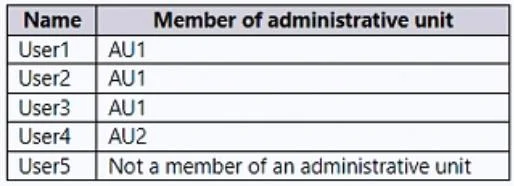
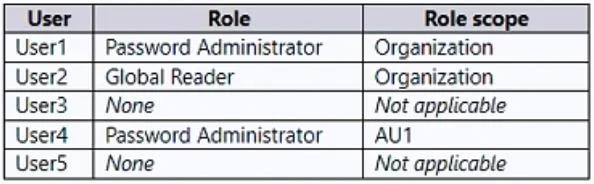
Answer Area
- User 1User2, User3, User4, and User5User3 onlyUser2 and User5 onlyUser3 and User5 onlyUser2, User3, and User5 onlyUser3, User4 and User5 onlyUser2, User3, User4, and User5
- User 4User1, User2, and User3 onlyUser3 onlyUser2 and User3 onlyUser3 and User5 onlyUser1, User2, and User3 only
Explanation
This question tests the understanding of Azure AD 'Password Administrator' role permissions and the impact of administrative unit (AU) scoping on delegated password reset capabilities.
Approach. To determine which users User1 and User4 can reset passwords for, we must analyze their assigned roles, role scopes, and the administrative unit memberships of potential target users.
For User1:
- Role: Password Administrator
- Role Scope: Organization (meaning permissions apply across the entire Azure AD tenant).
- Password Administrator Capabilities: This role can reset passwords for all non-administrator users and users assigned to certain administrative roles, excluding Global Administrators and Privileged Role Administrators. It can reset other Password Administrators' passwords if they are not also a GA or PRA.
- Analysis of target users for User1:
- User2 (Global Reader, Organization scope): User2 has an administrative role, but it is not Global Administrator or Privileged Role Administrator. User1 can reset User2's password.
- User3 (None): User3 is a non-administrator user. User1 can reset User3's password.
- User4 (Password Administrator, AU1 scope): User4 has an administrative role (Password Administrator). User4 is not a Global Administrator or Privileged Role Administrator. An organization-scoped Password Administrator (User1) can therefore reset User4's password.
- User5 (None): User5 is a non-administrator user. User1 can reset User5's password.
- Conclusion for User1: User1 can reset passwords for User2, User3, User4, and User5. (This corresponds to the selection in the solved image).
For User4:
- Role: Password Administrator
- Role Scope: AU1 (meaning permissions are limited to objects within Administrative Unit 1).
- Password Administrator Capabilities (AU-scoped): User4 can reset passwords for eligible users who are members of AU1, provided those users are not Global Administrators or Privileged Role Administrators.
- Identify users in AU1 (from Table 1): User1, User2, User3.
- Analysis of target users for User4:
- User1 (Password Administrator, Organization scope): User1 is a member of AU1. User1 has an administrative role (Password Administrator) but is not a Global Administrator or Privileged Role Administrator. Since User1 is within User4's AU1 scope and not a protected role, User4 can reset User1's password.
- User2 (Global Reader, Organization scope): User2 is a member of AU1. User2 has an administrative role but is not Global Administrator or Privileged Role Administrator. User4 can reset User2's password.
- User3 (None): User3 is a member of AU1. User3 is a non-administrator user. User4 can reset User3's password.
- User5 (None): User5 is not a member of AU1. User4's permissions are scoped to AU1, so User4 cannot reset User5's password.
- Conclusion for User4: User4 can reset passwords for User1, User2, and User3. (This corresponds to the selection in the solved image).
Therefore, the correct interactions are selecting 'User2, User3, User4, and User5' for User1, and 'User1, User2, and User3 only' for User4.
Common mistakes.
- common_mistake. Common mistakes include:
- Incorrectly assuming a Password Administrator cannot reset another Password Administrator's password: The 'Password Administrator' role is restricted from resetting passwords for 'Global Administrator' and 'Privileged Role Administrator' roles only. Other administrative roles, including other 'Password Administrator' roles, are generally within scope for password resets if the administering user's scope allows it and the target is not a GA/PRA. For example, User1 (Org-scoped PA) can reset User4's (AU1-scoped PA) password, and User4 (AU1-scoped PA) can reset User1's (Org-scoped PA) password because User1 is in AU1 and is not a GA/PRA.
- Ignoring the Administrative Unit scope for delegated administration: For User4, selecting users who are not members of AU1 (e.g., User5). An AU-scoped role strictly limits permissions to objects within that specific administrative unit.
- Misunderstanding the impact of the target user's role scope: Believing that an AU-scoped admin (like User4) cannot manage a user with an Organization-scoped role (like User1). The key factor is whether the target user object is within the admin's scope (e.g., User1 is in AU1 for User4), and if the target's role is protected (GA/PRA), not the scope of the target's role itself.
Concept tested. This question primarily tests knowledge of:
- Azure Active Directory Built-in Roles: Specifically, the capabilities and limitations of the 'Password Administrator' role.
- Administrative Units (AUs): How AUs are used to delegate administrative permissions over a subset of users/objects.
- Role Scoping: Understanding the difference between 'Organization' scope and 'Administrative Unit' scope for assigned roles.
- Delegated Administration Principles: The rules governing an administrator's ability to manage other administrators or users based on their respective roles and scopes.
Topics
Community Discussion
No community discussion yet for this question.