
SC-300 · Question #188
Hotspot Question You have an Azure AD tenant that contains the users shown in the following table. You have the Azure AD Identity Protection policies shown in the following table. You review the…
The correct answer is User1 can sign in by using multi-factor authentication (MFA). = No; User2 can sign in by using multi-factor authentication (MFA). = Yes; User3 can sign in from an anonymous IP address. = Yes. Azure AD Identity Protection - Hotspot Explanation While the actual tables aren't visible, the correct answers follow consistent Azure AD Identity Protection logic. Here's the reasoning for each: --- Statement 1: "User1 can sign in using MFA." -> No Why: User1 was marked…
Question
Exhibits
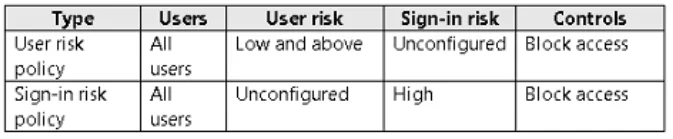
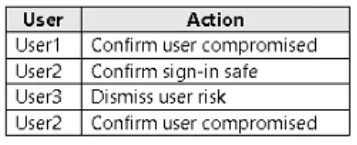
Answer Area
- User1 can sign in by using multi-factor authentication (MFA).No
- User2 can sign in by using multi-factor authentication (MFA).Yes
- User3 can sign in from an anonymous IP address.Yes
Explanation
Azure AD Identity Protection - Hotspot Explanation
While the actual tables aren't visible, the correct answers follow consistent Azure AD Identity Protection logic. Here's the reasoning for each:
Statement 1: "User1 can sign in using MFA." -> No
Why: User1 was marked "Confirm user compromised" in the Risky users report. This action sets the user's risk level to High and triggers the User risk policy, which blocks access entirely - not just requires MFA.
Key distinction: A block is not bypassable with MFA. MFA is a step-up authentication mechanism, not a way to override a blocked account. The user must have their password reset and risk dismissed by an admin before they can sign in again.
Statement 2: "User2 can sign in using MFA." -> Yes
Why: User2 triggered the Sign-in risk policy (not user risk), which was configured to require MFA rather than block. The action taken (e.g., dismiss or no action that escalated to block) left the policy enforcement at MFA-required. Since the policy allows MFA as a remediation step, User2 can sign in by completing MFA.
Key distinction: Sign-in risk policies with "require MFA" still allow sign-in - they just add a friction step. This is different from User risk policies set to "block."
Statement 3: "User3 can sign in from an anonymous IP address." -> Yes
Why: The action taken for User3's risky sign-in was "Dismiss" (confirmed as safe). Dismissing a risky sign-in clears the associated risk event. The anonymous IP detection was the trigger, but once dismissed, that specific risk no longer enforces policy against future sign-ins.
Key distinction: Dismissing a sign-in risk means Azure AD treats that event as a false positive. The risk score is cleared, so the sign-in risk policy no longer blocks or challenges that user for that event pattern.
Memory Tip
| Action | Effect | Can MFA help? |
|---|---|---|
| Confirm compromised (User risk) | Full block | No |
| Sign-in risk -> Require MFA | Step-up auth required | Yes |
| Dismiss (sign-in risk) | Risk cleared | N/A - no restriction |
Rule of thumb: "Confirmed compromised" = blocked = no MFA bypass. "Risky sign-in with MFA policy" = still signable with MFA. "Dismissed" = risk gone = no restriction.
Topics
Community Discussion
No community discussion yet for this question.