
SC-300 · Question #164
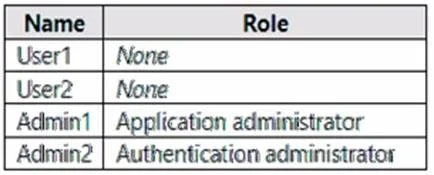
You have an Azure Active Directory (Azure AD) tenant that contains the users shown in, the following table. The User settings for enterprise applications have the following configurations: - Users…
The correct answer is C. Admin1. To approve requests, a reviewer must be a global administrator, cloud application administrator, or application administrator. https://docs.microsoft.com/en-us/azure/active-directory/manage-apps/configure-admin-consent-
Question
You have an Azure Active Directory (Azure AD) tenant that contains the users shown in, the following table. The User settings for enterprise applications have the following configurations:
- Users can consent to apps accessing company data on their behalf: No
- Users can consent to apps accessing company data for the groups they own: No
- Users can request admin consent to apps they are unable to consent to: Yes
- Who can review admin consent requests: Admin2, User2
User1 attempts, to add an app that requires consent to access company data. Which user can provide consent?
Exhibit
Options
- AUser1
- BUser2
- CAdmin1
- DAdmin2
How the community answered
(23 responses)- A17% (4)
- B4% (1)
- C74% (17)
- D4% (1)
Explanation
To approve requests, a reviewer must be a global administrator, cloud application administrator, or application administrator. https://docs.microsoft.com/en-us/azure/active-directory/manage-apps/configure-admin-consent-
Topics
Community Discussion
No community discussion yet for this question.