
SC-300 · Question #141
Hotspot Question You have an Azure Active Directory (Azure AD) tenant contains the users shown in the following table. In Azure AD Privileged Identity Management (PIM), you configure the Global…
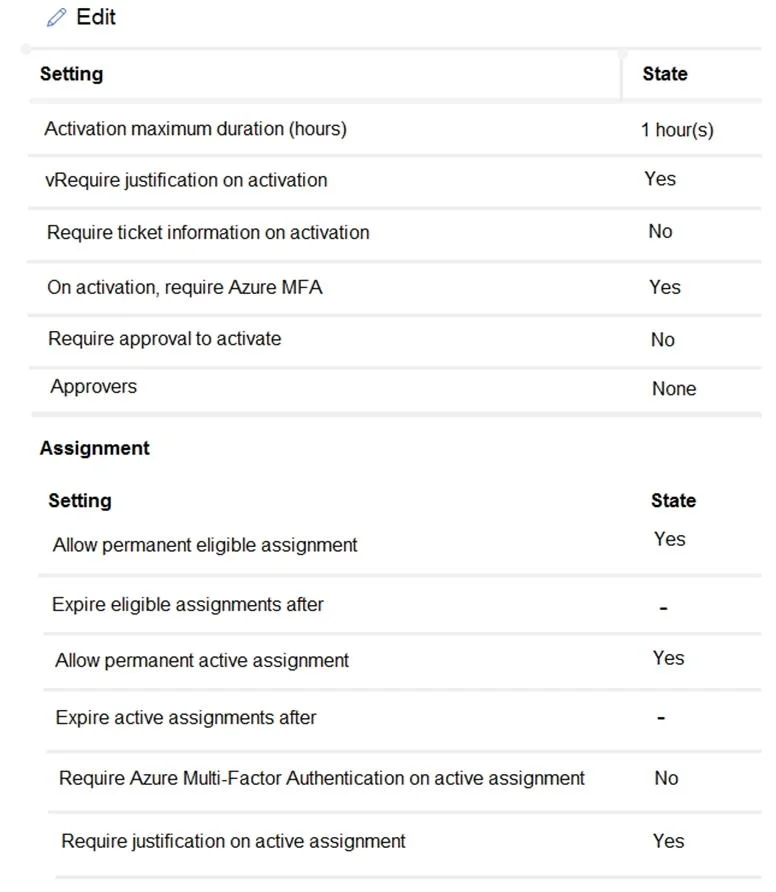
The correct answer is User1 requires Azure Multi-Factor Authentication (MFA) to activate the Global administrator role. = Yes; User2 must approve all activation requests for the Global administrator role. = No; User2 and User3 can edit the Global administrator role assignment. = No. User1 requires MFA to activate the Global administrator role because in PIM, the default and recommended configuration requires Azure MFA on activation, and the exhibit shows 'Require Azure MFA' is enabled for this role. User2 does not need to approve ALL activation requests…
Question
Exhibits

Answer Area
- User1 requires Azure Multi-Factor Authentication (MFA) to activate the Global administrator role.Yes
- User2 must approve all activation requests for the Global administrator role.No
- User2 and User3 can edit the Global administrator role assignment.No
Explanation
User1 requires MFA to activate the Global administrator role because in PIM, the default and recommended configuration requires Azure MFA on activation, and the exhibit shows 'Require Azure MFA' is enabled for this role. User2 does not need to approve ALL activation requests because while approval may be required, User2 alone is not necessarily the sole designated approver - and if no specific approver is configured or User2 is not assigned as an approver, the system uses default approvers. User2 and User3 cannot edit the Global administrator role assignment because editing PIM role settings requires the Privileged Role Administrator or Global Administrator role, and based on the user table, neither User2 nor User3 holds such a role - only Global Administrators or Privileged Role Administrators can modify PIM configurations.
Topics
Community Discussion
No community discussion yet for this question.