
SC-300 · Question #129
Hotspot Question You have an Azure Active Directory (Azure AD) tenant that has an Azure Active Directory Premium Plan 2 license. The tenant contains the users shown in the following table. You have…
The correct answer is User1 can join four additional Windows 10 devices to Azure AD. = No; Admin1 can set Devices to be Azure AD joined or Azure AD registered require Multi-Factor Authentication to Yes. = Yes; Admin2 is a local administrator on Device3. = No. User1 already has 3 devices joined, and the Maximum number of devices per user is set to 5 in Device Settings, meaning User1 can only join 2 more devices (not four), making the first statement No. Admin1, being a Global Administrator or similar privileged role, can configure…
Question
Exhibits
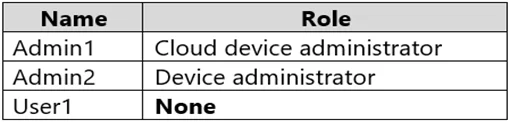
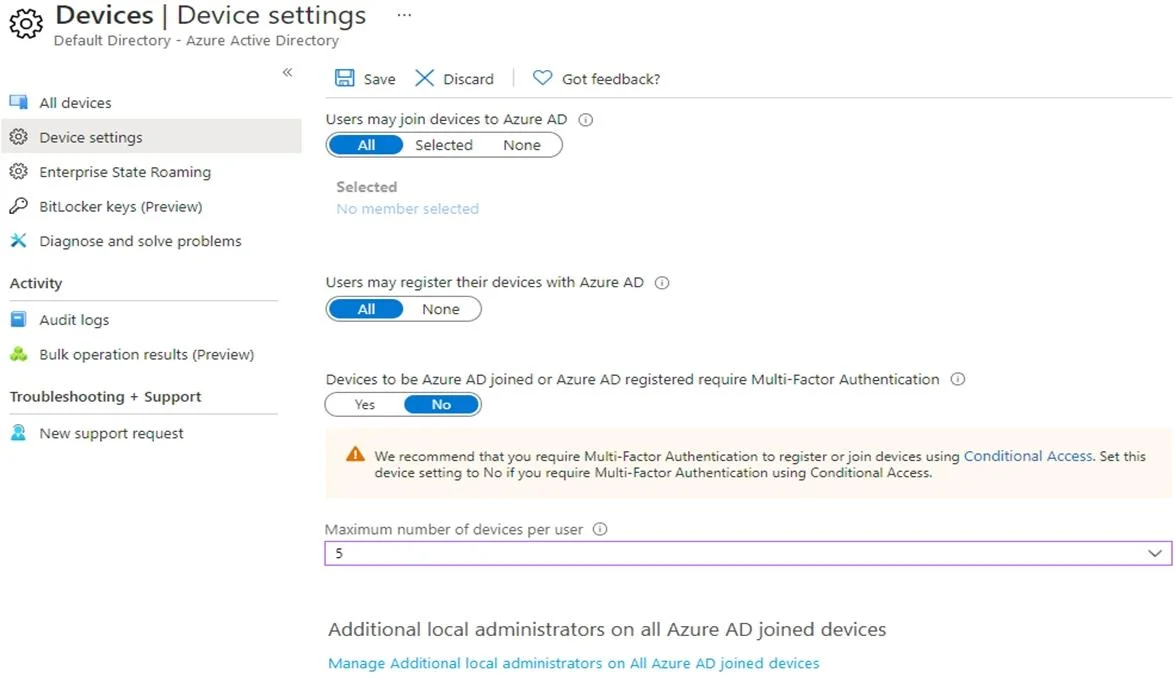
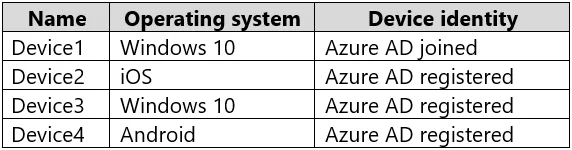

Answer Area
- User1 can join four additional Windows 10 devices to Azure AD.No
- Admin1 can set Devices to be Azure AD joined or Azure AD registered require Multi-Factor Authentication to Yes.Yes
- Admin2 is a local administrator on Device3.No
Explanation
User1 already has 3 devices joined, and the Maximum number of devices per user is set to 5 in Device Settings, meaning User1 can only join 2 more devices (not four), making the first statement No. Admin1, being a Global Administrator or similar privileged role, can configure the 'Require Multi-Factor Authentication to join devices' setting in Device Settings, making the second statement Yes. Admin2 is listed as a Local administrator only if they are added under 'Additional local administrators on all Azure AD joined devices' or are a Global Admin; since the exhibit shows only specific roles/users as local admins and Admin2 does not qualify for Device3 specifically, the third statement is No.
Topics
Community Discussion
No community discussion yet for this question.