
SC-300 · Question #114
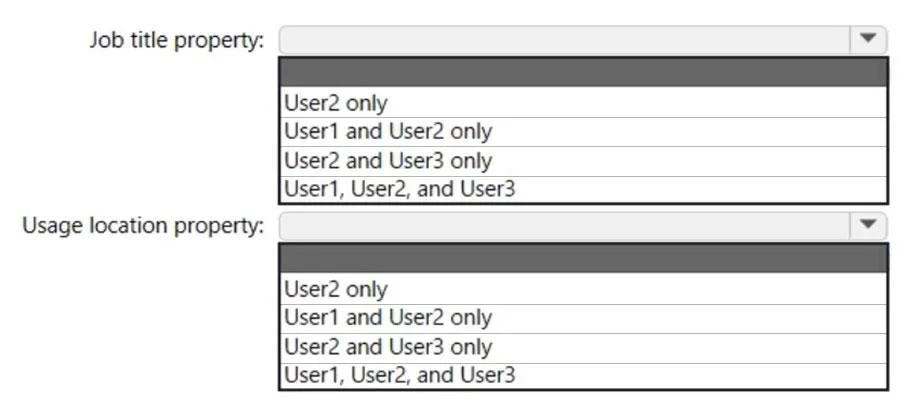
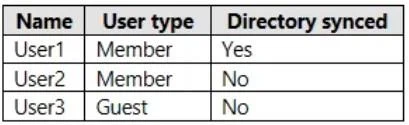
Hotspot Question You have an Azure Active Directory (Azure AD) tenant that contains the users shown in the following table. For which users can you configure the Job title property and the Usage…
The correct answer is Job title property: User2 and User3 only; Usage location property: User1, User2, and User3. This question tests your knowledge of which Azure AD user properties can be edited depending on the user's source (cloud-native vs. synchronized from on-premises Active Directory). Certain properties are managed in the on-premises AD and synced to Azure AD, making them…
Question
Exhibits
Answer Area
- Job title propertyUser2 and User3 onlyUser2 onlyUser1 and User2 onlyUser2 and User3 onlyUser1, User2, and User3
- Usage location propertyUser1, User2, and User3User2 onlyUser1 and User2 onlyUser2 and User3 onlyUser1, User2, and User3
Explanation
This question tests your knowledge of which Azure AD user properties can be edited depending on the user's source (cloud-native vs. synchronized from on-premises Active Directory). Certain properties are managed in the on-premises AD and synced to Azure AD, making them read-only in the Azure AD portal.
Approach. In Azure AD, 'Job title' is an attribute that is writable for cloud-only users but is synchronized (and therefore read-only in Azure AD) for users whose source is 'Windows Server AD' (on-premises AD sync via Azure AD Connect). 'Usage location' is a property that can be edited in Azure AD regardless of the user's source - it is not synchronized from on-premises AD and must be set in Azure AD. Therefore: for cloud-only users (Source = Azure Active Directory), BOTH Job title and Usage location can be configured. For synced users (Source = Windows Server AD), only Usage location can be configured in Azure AD - Job title must be changed in the on-premises AD and will sync to Azure AD. The key distinction is: synchronized attributes from on-premises AD are read-only in Azure AD, while cloud-managed attributes like Usage location remain editable in Azure AD for all user types.
Concept tested. Azure AD user property editability based on user source (cloud-only vs. on-premises AD synchronized users). Specifically, understanding which attributes are controlled by Azure AD Connect sync and are therefore read-only in the Azure AD portal versus which attributes are always managed in Azure AD.
Topics
Community Discussion
No community discussion yet for this question.