
SC-200 · Question #256
Case Study 4 - Litware Inc Overview Adatum Corporation is a United States-based financial services company that has regional offices in New York, Chicago, and San Francisco. Existing Environment…
The correct answer is B. entity mapping. This question is a partial prompt from a case study, which typically asks about configuring specific aspects of Microsoft Sentinel. Given the choices, "entity mapping" is a critical configuration step for Microsoft Sentinel to correctly identify and correlate entities from…
Question
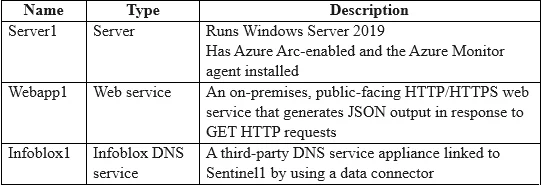
Case Study 4 - Litware Inc Overview Adatum Corporation is a United States-based financial services company that has regional offices in New York, Chicago, and San Francisco. Existing Environment Identity Environment The on-premises network contains an Active Directory Domain Services (AD DS) forest named corp.adatum.com that syncs with an Azure AD tenant named adatum.com. All user and group management tasks are performed in corp.adatum.com. The corp.adatum.com domain contains a group named Group1 that syncs with adatum.com. Licensing Status All the users at Adatum are assigned a Microsoft 365 ES license and an Azure Active Directory Premium P2 license. Cloud Environment The cloud environment contains a Microsoft 365 subscription, an Azure subscription linked to the adatum.com tenant, and the resources shown in the following table. On-premises Environment The on-premises network contains the resources shown in the following table. Requirements Planned changes Adatum plans to perform the following changes:
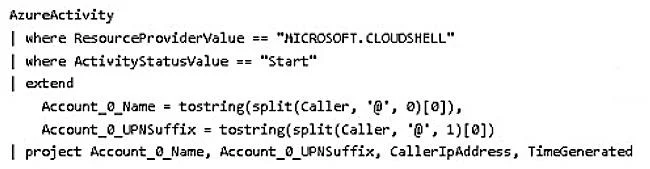
- Implement a query named rulequery1 that will include the following KQL query.
- Implement a Microsoft Sentinel scheduled rule that generates incidents based on rulequery1.
Microsoft Defender for Cloud Requirements Adatum identifies the following Microsoft Defender for Cloud requirements:
- The members of Group1 must be able to enable Defender for Cloud plans and apply regulatory
compliance initiatives.
- Microsoft Defender for Servers Plan 2 must be enabled on all the Azure virtual machines.
- Server2 must be excluded from agentless scanning.
Microsoft Sentinel Requirements Adatum identifies the following Microsoft Sentinel requirements:
- Implement an Advanced Security Information Model (ASIM) query that will return a count of
DNS requests that results in an NXDOMAIN response from Infoblox1.
- Ensure that multiple alerts generated by rulequery1 in response to a single user launching
Azure Cloud Shell multiple times are consolidated as a single incident.
- Implement the Windows Security Events via AMA connector for Microsoft Sentinel and configure
it to monitor the Security event log of Server1.
- Ensure that incidents generated by rulequery1 are closed automatically if Azure Cloud Shell is
launched by the company’s SecOps team.
- Implement a custom Microsoft Sentinel workbook named Workbook1 that will include a query to
dynamically retrieve data from Webapp1.
- Implement a Microsoft Sentinel near-real-time (NRT) analytics rule that detects sign-ins to a
designated break glass account.
- Ensure that HuntingQuery1 runs automatically when the Hunting page of Microsoft Sentinel in
the Azure portal is accessed.
- Ensure that higher than normal volumes of password resets for corp.adatum.com user accounts
are detected.
- Minimize the overhead associated with queries that use ASIM parsers.
- Ensure that the Group1 members can create and edit playbooks.
- Use built-in ASIM parsers whenever possible.
Business Requirements Adatum identifies the following business requirements:
- Follow the principle of least privilege whenever possible.
- Minimize administrative effort whenever possible.
You need to implement the scheduled rule for incident generation based on rulequery1. What should you configure first?
Exhibits
Options
- Acustom details
- Bentity mapping
- Cevent grouping
- Dalert details
How the community answered
(27 responses)- A7% (2)
- B70% (19)
- C19% (5)
- D4% (1)
Why each option
This question is a partial prompt from a case study, which typically asks about configuring specific aspects of Microsoft Sentinel. Given the choices, "entity mapping" is a critical configuration step for Microsoft Sentinel to correctly identify and correlate entities from ingested logs into its internal entity model.
Custom details allow you to surface specific fields from the original alert as visible properties on the incident, but they don't define how entities are recognized and correlated.
Entity mapping in Microsoft Sentinel allows you to specify which fields from your ingested logs represent standard entity types (like Accounts, IPs, Hosts, URLs) so that Sentinel can build behavioral profiles, link related alerts, and perform advanced analysis. This is fundamental for UEBA and incident investigation.
Event grouping refers to how multiple events are combined into a single alert or incident, which is different from defining entity properties within an event.
Alert details are properties displayed for an alert, but entity mapping is the process that enables Sentinel to recognize and use entities within those alerts.
Concept tested: Microsoft Sentinel entity mapping
Source: https://learn.microsoft.com/en-us/azure/sentinel/map-data-fields-to-entities
Topics
Community Discussion
No community discussion yet for this question.