
SC-100 · Question #99
Drag and Drop Question Your company has Microsoft 365 E5 licenses and Azure subscriptions. The company plans to automatically label sensitive data stored in the following locations: - Microsoft…
The correct answer is Groups and sites; Groups and sites; Files and emails. The correct approach for automatically labeling sensitive data involves selecting the appropriate sensitivity label policy scopes for SharePoint Online, Microsoft Teams, and Exchange Online based on whether protection targets containers or individual items.
Question
Exhibit
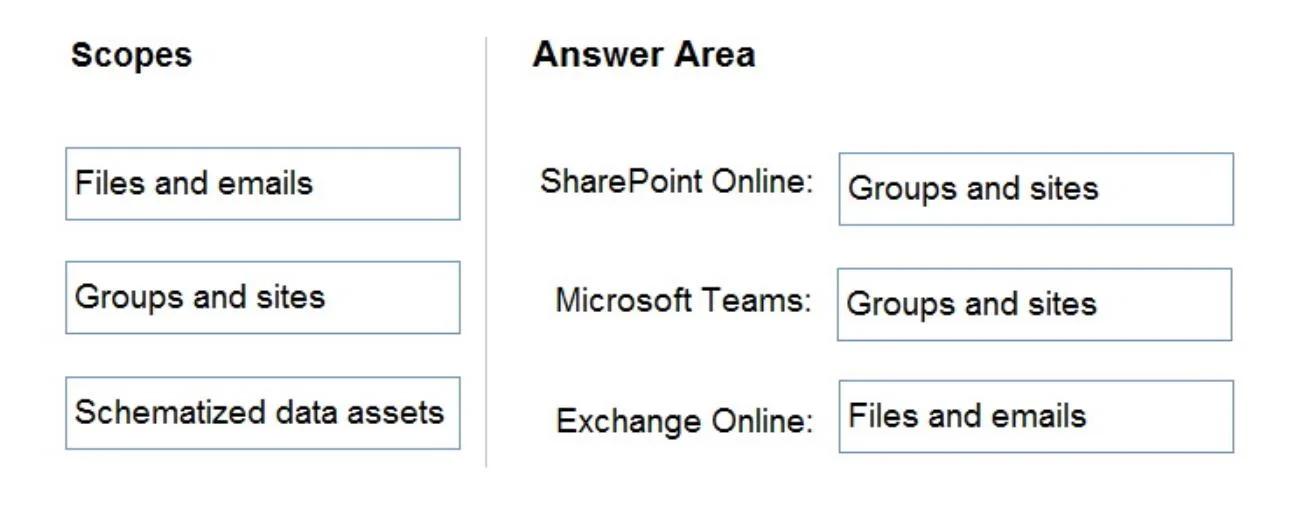
Answer Area
Drag items
Correct arrangement
- Groups and sites
- Groups and sites
- Files and emails
Explanation
The correct approach for automatically labeling sensitive data involves selecting the appropriate sensitivity label policy scopes for SharePoint Online, Microsoft Teams, and Exchange Online based on whether protection targets containers or individual items.
Approach. To correctly identify and protect sensitive data across the specified Microsoft 365 locations, the following scopes should be recommended for sensitivity label policies: - SharePoint Online: Groups and sites - Sensitivity labels can be applied to SharePoint sites (which are 'sites') as containers. Applying a label at this scope provides container-level protection, controlling settings like external sharing, guest access, and authentication context for the entire site and its contents. This is a comprehensive approach to securing data stored within SharePoint. - Microsoft Teams: Groups and sites - Microsoft Teams are fundamentally built upon Microsoft 365 Groups. Therefore, to apply a sensitivity label policy to a Microsoft Team, the 'Groups and sites' scope is selected. This allows for enforcing protection policies on the Team's underlying Microsoft 365 Group, which in turn governs access, sharing, and other security settings for the team and its associated resources (like its SharePoint site and Exchange mailbox). - Exchange Online: Files and emails - Exchange Online's primary function is email and calendar management. To automatically label sensitive data within Exchange Online, policies target individual email messages and calendar items, which fall under the 'Files and emails' scope. This enables content inspection and automatic application of labels to sensitive information found within email communications.
Common mistakes.
- common_mistake. Common mistakes include misassigning scopes based on a superficial understanding of the services. For example, assigning 'Files and emails' to Microsoft Teams or SharePoint Online as the primary protection scope for the service itself is incorrect because 'Groups and sites' offers crucial container-level governance for these collaborative spaces, which is often the intent for 'automatically label sensitive data stored in' these locations. While individual files within SharePoint can be labeled, the question implies a strategy for the service. Assigning 'Groups and sites' to Exchange Online would be incorrect because Exchange primarily deals with individual email items, not container-level protection in the same sense as M365 Groups or SharePoint sites. Lastly, 'Schematized data assets' is a scope for structured data sources like databases and Power BI datasets, and is therefore entirely inappropriate for SharePoint Online, Microsoft Teams, or Exchange Online, which handle unstructured or semi-structured collaborative data.
Concept tested. Microsoft Purview Information Protection (formerly Microsoft Information Protection) - understanding the appropriate scopes for sensitivity label policies across various Microsoft 365 services, particularly distinguishing between item-level ('Files and emails') and container-level ('Groups and sites') protection.
Topics
Community Discussion
No community discussion yet for this question.