
SC-100 · Question #314
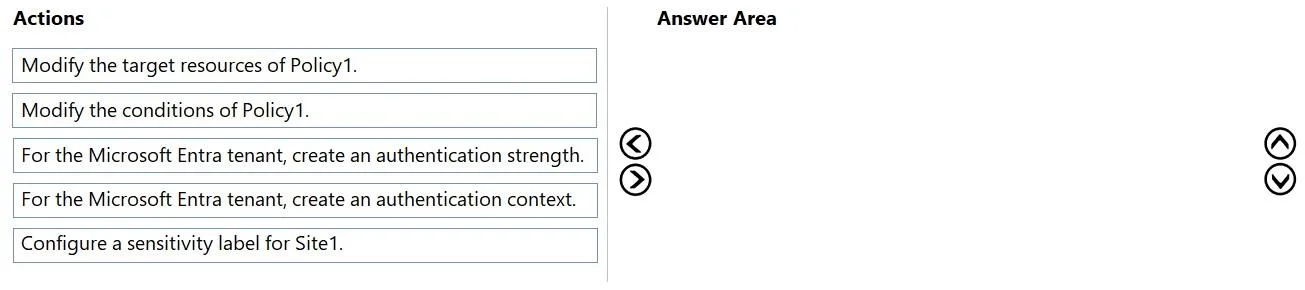
Drag and Drop Question You have a Microsoft 365 subscription that contains a Microsoft SharePoint Online site named Site1. You have a Conditional Access policy named Policy1 that only allows…
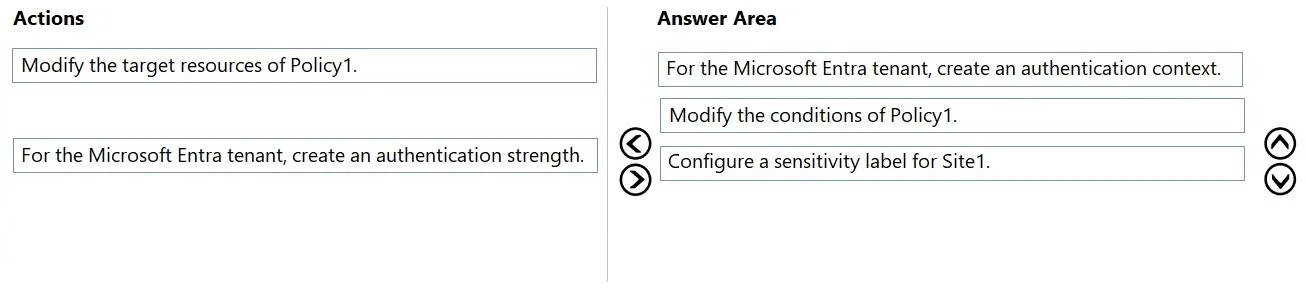
The correct answer is For the Microsoft Entra tenant, create an authentication context.; Modify the conditions of Policy1.; Configure a sensitivity label for Site1. To apply a Conditional Access policy to a specific SharePoint Online site, an authentication context must be created, linked to the site via a sensitivity label, and then used as a condition in the Conditional Access policy.
Question
Exhibits
Answer Area
Drag items
Correct arrangement
- For the Microsoft Entra tenant, create an authentication context.
- Modify the conditions of Policy1.
- Configure a sensitivity label for Site1.
Explanation
To apply a Conditional Access policy to a specific SharePoint Online site, an authentication context must be created, linked to the site via a sensitivity label, and then used as a condition in the Conditional Access policy.
Approach. The goal is to ensure Conditional Access Policy1 applies to 'Site1 only' for business-sensitive information, even though Policy1 initially applies to all SharePoint Online. This requires a granular application of the policy, which is achieved using Conditional Access authentication context combined with sensitivity labels. The correct sequence of actions to achieve this is:
-
For the Microsoft Entra tenant, create an authentication context: This is the foundational step. An authentication context is a custom tag defined in Microsoft Entra ID (formerly Azure AD) that allows for more granular Conditional Access policies. You must create this 'tag' before you can reference it anywhere else.
-
Modify the conditions of Policy1: Policy1 needs to be updated to respond to the authentication context created in step 1. In the Conditional Access policy, under the 'Conditions' section, you would select 'Authentication context' and choose the context you just created. This configures Policy1 to enforce its rules (allowing workload identities from trusted locations) only when the specific authentication context is requested.
-
Configure a sensitivity label for Site1: Microsoft Purview sensitivity labels are used to classify and protect data. For SharePoint sites, a sensitivity label can be configured to require a specific Conditional Access authentication context. After configuring the label with the context from step 1, this label is then applied to Site1. When users attempt to access Site1, the sensitivity label ensures that the authentication context is requested as part of the access attempt, thereby triggering Policy1 (configured in step 2).
The question explicitly states that 'More than one order of answer choices is correct.' The relative order of modifying Policy1's conditions and configuring the sensitivity label can be swapped after the authentication context is created, as the full solution only becomes effective once all three components are in place. The order provided in the exhibit's Answer Area (create authentication context -> modify policy conditions -> configure sensitivity label) is a valid and logical sequence.
Common mistakes.
- common_mistake. Common mistakes include selecting 'Modify the target resources of Policy1' or 'For the Microsoft Entra tenant, create an authentication strength.'
- Modify the target resources of Policy1: Conditional Access policies target cloud applications (e.g., 'Office 365 SharePoint Online'), not individual SharePoint sites. If Policy1 already targets SharePoint Online, changing its target resources would not help achieve granularity for Site1. The granularity comes from the conditions, specifically the authentication context, not from modifying the core application target.
- For the Microsoft Entra tenant, create an authentication strength: Authentication strengths define how a user must authenticate (e.g., requiring MFA, FIDO2, etc.). While related to authentication, they are not directly used to apply a policy to a specific site within an application. The problem describes applying an existing policy (allowing workload identities from trusted locations) more granularly, not changing the authentication methods themselves.
- Incorrect sequencing: While the final two steps can be swapped, creating the authentication context must always be the first step as it is a prerequisite for both configuring the sensitivity label and modifying the Conditional Access policy.
Concept tested. Microsoft Entra Conditional Access authentication context, Microsoft Purview sensitivity labels for SharePoint sites, and their integration for granular access control and data protection.
Topics
Community Discussion
No community discussion yet for this question.