
PT0-003 · Question #138
SIMULATION A previous penetration test report identified a host with vulnerabilities that was successfully exploited. Management has requested that an internal member of the security team reassess…
Exam Simulation Explanation: Vulnerability Reassessment Overall Goal This simulation tests whether you can perform a structured penetration test reassessment - verifying that a previously identified vulnerability persists and understanding how an attacker would exploit it…
Question
SIMULATION A previous penetration test report identified a host with vulnerabilities that was successfully exploited. Management has requested that an internal member of the security team reassess the host to determine if the vulnerability still exists. INSTRUCTIONS Part 1:
Analyze the output and select the command to exploit the vulnerable service. Part 2:
Click on each command to view its output. Select the appropriate set of commands to escalate privileges. Identify which remediation steps should be taken. If at any time you would like to bring back the initial state of the simulation, please click the Reset All button. Answer:
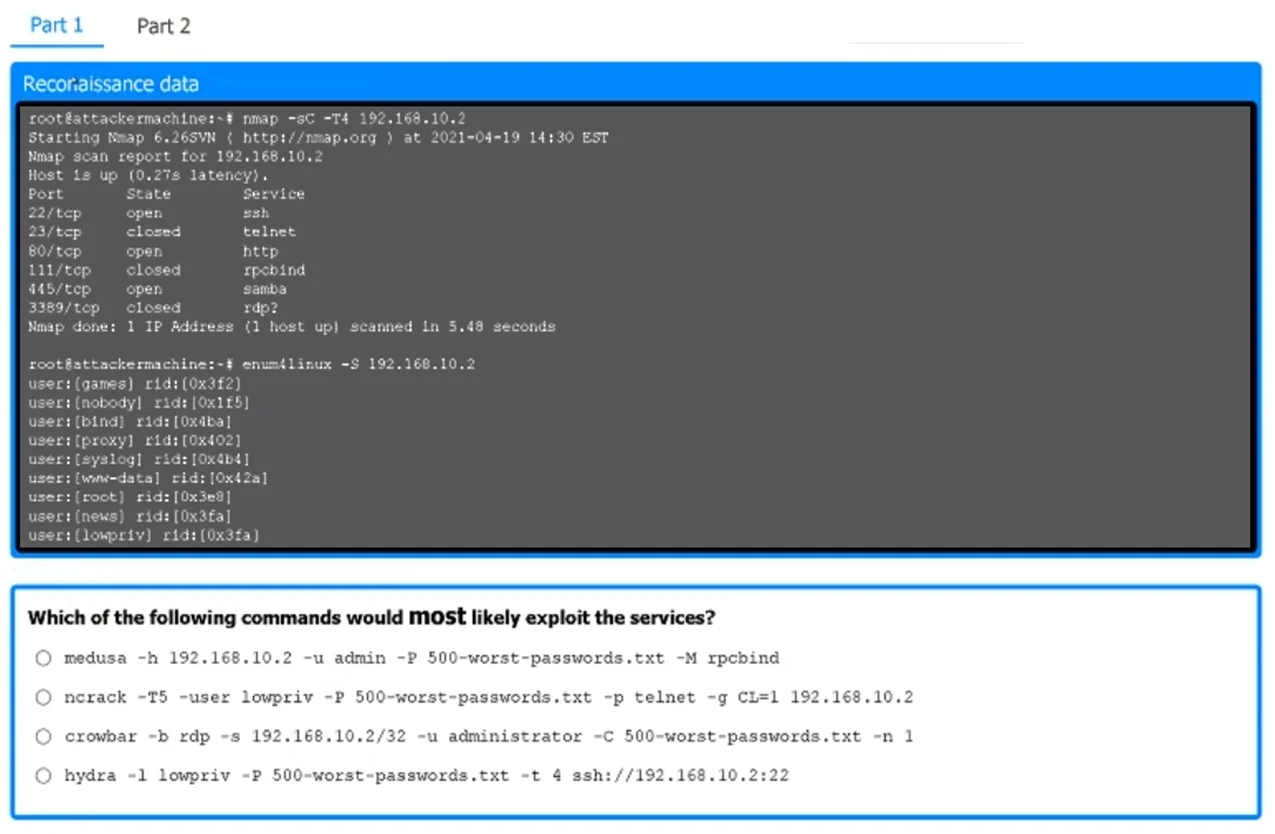
Part 1 - Exploiting the Vulnerable Service The nmap scan output shows open services on 192.168.10.2, including:
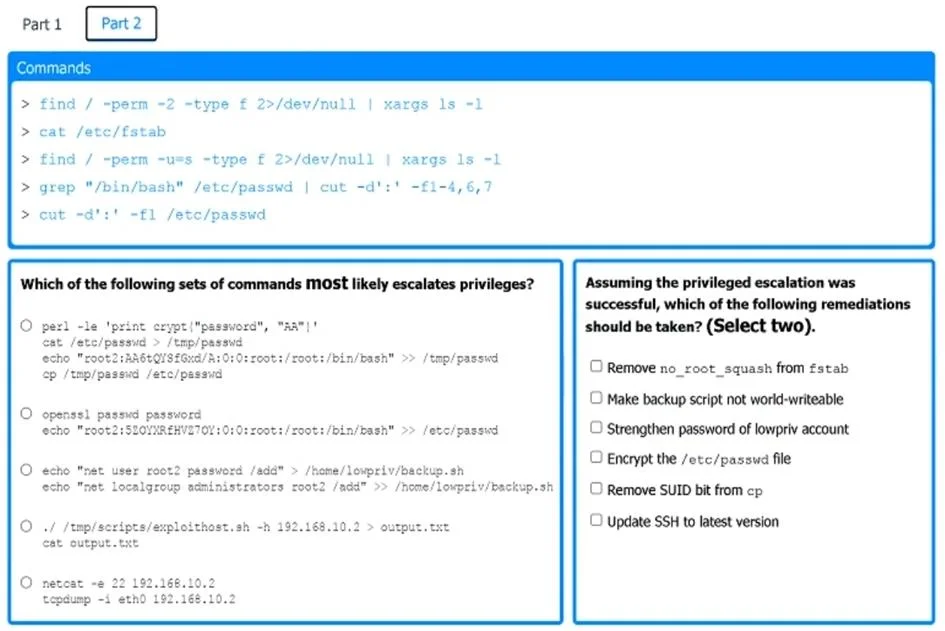
22/tcp (SSH) 80/tcp (HTTP) 445/tcp (Samba) Additionally, enum4linux results indicate the presence of user accounts, suggesting that brute- force attacks on SSH or Samba could be viable. The most appropriate exploitation command from the given options is: hydra -l lowpriv -P 500-worst-passwords.txt -t 4 ssh://192.168.10.2:22 This command uses hydra to perform a brute-force attack against the SSH service (22/tcp) on the target host. The user "lowpriv" (identified from enum4linux results) is targeted. The password list "500-worst-passwords.txt" is used to attempt login. The -t 4 option specifies the number of parallel tasks to speed up the attack. Part 2 - Privilege Escalation The correct set of commands to escalate privileges is: openssl passwd password echo "root2:$2QYXRHtV07QY:0:0:root:/root:/bin/bash" >> /etc/passwd openssl passwd password generates a hashed password. The echo command modifies /etc/passwd, adding a new root-level user (root2). This effectively grants root privileges to the attacker. Part 2 - Remediation Steps The two most appropriate remediation measures are:
Remove no_root_squash from fstab Make backup script not world-writeable Removing no_root_squash from /etc/fstab prevents root users on NFS-mounted systems from having full root privileges, reducing privilege escalation risks. Making the backup script not world- writeable prevents unauthorized modifications that could be leveraged for privilege escalation.
Exhibits
Explanation
Exam Simulation Explanation: Vulnerability Reassessment
Overall Goal
This simulation tests whether you can perform a structured penetration test reassessment - verifying that a previously identified vulnerability persists and understanding how an attacker would exploit it end-to-end, then recommending fixes. The workflow mirrors real-world security team tasks: enumerate -> exploit -> escalate -> remediate.
Step 1: Analyze Nmap Output
Why: Reconnaissance is always first. You cannot exploit what you haven't identified. The Nmap scan reveals:
22/tcp- SSH (brute-forceable if weak credentials exist)80/tcp- HTTP (web attack surface)445/tcp- Samba (lateral movement, enum4linux reveals usernames)
What it accomplishes: Narrows the attack surface. The combination of an open SSH port and a username (lowpriv) retrieved via enum4linux from Samba creates the conditions for a credential attack.
If skipped: You'd be guessing the service and username, making exploitation unreliable - and on an exam, you'd pick the wrong command.
Step 2: Brute-Force SSH with Hydra
hydra -l lowpriv -P 500-worst-passwords.txt -t 4 ssh://192.168.10.2:22
Why this command specifically:
| Flag | Purpose |
|---|---|
-l lowpriv | Single known username from enum4linux |
-P 500-worst-passwords.txt | Password wordlist (common/weak passwords) |
-t 4 | 4 parallel threads (avoids overwhelming/locking the service) |
ssh://192.168.10.2:22 | Targets SSH explicitly |
What it accomplishes: Gains initial foothold as a low-privilege user. This is the only viable path given the open ports - Samba (445) was used for enumeration, but SSH provides an interactive shell.
If skipped: No access to the host at all. You cannot escalate privileges without first having a shell.
Step 3: Privilege Escalation via /etc/passwd Manipulation
openssl passwd password
echo "root2:$2QYXRHtV07QY:0:0:root:/root:/bin/bash" >> /etc/passwd
Why two commands:
openssl passwd password- Generates a hashed version of the passwordpasswordusing crypt. You need the hash, not plaintext, because/etc/passwdstores hashed credentials.- The
echoappends a new user entry with UID 0 and GID 0 - makingroot2a second root account.
The /etc/passwd format: username:hashed_password:UID:GID:comment:home_dir:shell
0:0= root-level UID/GID - this is what grants full privileges.
What it accomplishes: Creates a persistent backdoor root account. This only works if /etc/passwd is world-writeable - which is the misconfiguration being exploited.
If done out of order (without Step 2): You need write access to /etc/passwd, which requires an existing shell. No shell = no escalation.
If you skip openssl passwd: Putting a plaintext password in /etc/passwd won't authenticate correctly on modern systems.
Step 4: Remediation
Two correct fixes:
A. Remove no_root_squash from /etc/fstab
no_root_squashin NFS exports allows remote root users to act as root on the mounted filesystem. This is what permitted writing to/etc/passwd.- Removing it means NFS clients' root access is "squashed" to an unprivileged user.
B. Make the backup script not world-writeable
- A world-writeable script run by a privileged cron job is a classic escalation path - an attacker injects malicious commands that execute as root.
chmod 700orchmod 750on the script removes this vector.
Why not other options: Other distractors (disabling SSH, firewall rules) address access rather than the root cause misconfigurations that enabled escalation.
Memory Tip
"REAP" - the four phases in order:
Recon (Nmap + enum4linux) -> Exploit (Hydra brute-force) -> Ascend (passwd manipulation) -> Patch (fstab + script permissions)
Each phase feeds the next - you can't skip ahead. The exam will present distractor commands at each step; the correct choices always follow the principle of least available information (use what enumeration gave you) and least noise (e.g., -t 4 avoids lockouts).
Topics
Community Discussion
No community discussion yet for this question.