
PT0-002 · Question #370
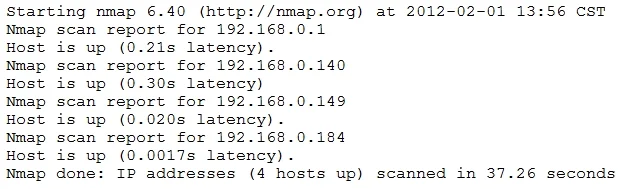
A penetration tester conducted a discovery scan that generated the following: Which of the following commands generated the results above and will transform them into a list of active hosts for…
The correct answer is B. nmap -sn 192.168.0.1-254 | grep "Nmap scan" | awk '{print $5}'. The 'nmap -sn' command performs a ping scan to discover active hosts without port scanning, and piping its output through 'grep "Nmap scan"' then 'awk '{{print $5}}'' effectively filters and extracts only the IP addresses of discovered hosts. This sequence creates a concise…
Question
A penetration tester conducted a discovery scan that generated the following:
Which of the following commands generated the results above and will transform them into a list of active hosts for further analysis?
Exhibit
Options
- Anmap -oG list.txt 192.168.0.1-254 | sort
- Bnmap -sn 192.168.0.1-254 | grep "Nmap scan" | awk '{print $5}'
- Cnmap --open 192.168.0.1-254 | uniq | sed 's/Nmap//2' > file.txt
- Dnmap -O 192.168.0.1-254 | cut -f
How the community answered
(27 responses)- A11% (3)
- B70% (19)
- C15% (4)
- D4% (1)
Why each option
The 'nmap -sn' command performs a ping scan to discover active hosts without port scanning, and piping its output through 'grep "Nmap scan"' then 'awk '{{print $5}}'' effectively filters and extracts only the IP addresses of discovered hosts. This sequence creates a concise list of active hosts, suitable for further targeted analysis.
'nmap -oG list.txt' saves output in Grepable format, but '| sort' without further parsing doesn't specifically extract only active hosts in a simple list format from the standard Nmap output for further analysis.
The 'nmap -sn' command performs a "ping scan" (host discovery) without port scanning, which is efficient for finding active hosts. Piping this output to 'grep "Nmap scan"' filters for lines indicating a host report, and 'awk '{{print $5}}'' then extracts the fifth field, which typically corresponds to the IP address of the active host.
'nmap --open' scans for open ports, not just host discovery, and piping to 'uniq' and 'sed' without specific output format knowledge won't reliably produce a list of active hosts. 'sed 's/Nmap//2'' is unlikely to correctly parse IP addresses from a standard Nmap output.
'nmap -O' performs OS detection, which is resource-intensive and not primarily for generating a list of active hosts efficiently. '| cut -f' is incomplete and wouldn't correctly extract host IPs without specifying delimiters and field numbers.
Concept tested: Nmap host discovery and command line parsing
Source: https://nmap.org/book/man-host-discovery.html
Topics
Community Discussion
No community discussion yet for this question.