
PROFESSIONAL-CLOUD-NETWORK-ENGINEER · Question #177
You have the networking configuration shown in the diagram. Two VLAN attachments associated with two Dedicated Interconnect connections terminate on the same Cloud Router (mycloudrouter). The…
The correct answer is C. From the Google Cloud console, navigate to the Hybrid Connectivity, select the Cloud Router. To troubleshoot asymmetric traffic flow over Dedicated Interconnect, examine the BGP routes advertised and received by the Cloud Router, including path attributes like MED, via the Google Cloud console's Hybrid Connectivity section.
Question
Exhibit
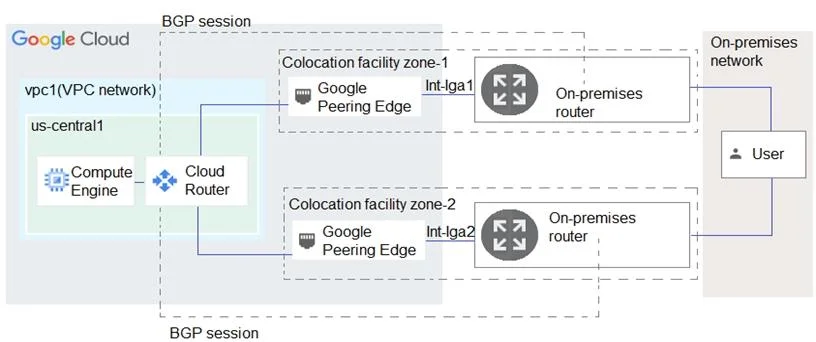
Options
- AFrom the Google Cloud console, navigate to Cloud Logging to view VPC Flow Logs and review
- BFrom the Cloud CLI, run gcloud compute --project PROJECT_ID routers get-status mycloudrouter
- CFrom the Google Cloud console, navigate to the Hybrid Connectivity, select the Cloud Router,
- DFrom the Cloud CLI, run gcloud compute routers describe mycloudrouter --region REGION and
How the community answered
(30 responses)- A10% (3)
- B7% (2)
- C80% (24)
- D3% (1)
Why each option
To troubleshoot asymmetric traffic flow over Dedicated Interconnect, examine the BGP routes advertised and received by the Cloud Router, including path attributes like MED, via the Google Cloud console's Hybrid Connectivity section.
VPC Flow Logs capture traffic within VPCs and to/from external IPs, but they do not provide direct insight into BGP routing decisions or path attributes that lead to asymmetric routing over Interconnect connections.
The `gcloud compute routers get-status` command provides BGP session status and routes, which is useful, but the Cloud Console view often offers a more user-friendly and comprehensive view for comparing attributes across multiple VLAN attachments visually for troubleshooting asymmetry.
Navigating to the Cloud Router details in the Google Cloud console under Hybrid Connectivity allows you to inspect the advertised and received BGP routes and their attributes (such as MED) for each VLAN attachment, which is critical for identifying why traffic might be taking different paths and causing asymmetry.
The `gcloud compute routers describe` command provides static configuration details of the Cloud Router, not the real-time operational status of BGP sessions or the detailed routing information necessary to diagnose asymmetric traffic flow caused by BGP path selection.
Concept tested: Troubleshooting BGP asymmetric routing on Cloud Interconnect
Source: https://cloud.google.com/network-connectivity/docs/interconnect/concepts/bgp-best-path-selection
Topics
Community Discussion
No community discussion yet for this question.