
PROFESSIONAL-CLOUD-NETWORK-ENGINEER · Question #175
You have the networking configuration shown in the diagram. A pair of redundant Dedicated Interconnect connections (int-Iga1 and int-Iga2) terminate on the same Cloud Router. The Interconnect…
The correct answer is A. Configure the advertised route priority as 200 for the BGP session associated with the active C. Advertise a lower MED on the active Interconnect connection from the on-premises router. To configure active/passive failover with Dedicated Interconnect on Google Cloud, you must control both egress (Google → on-premises) and ingress (on-premises → Google) traffic paths. For egress, Google Cloud uses the Cloud Router's advertised route priority: a higher priority…
Question
Exhibit
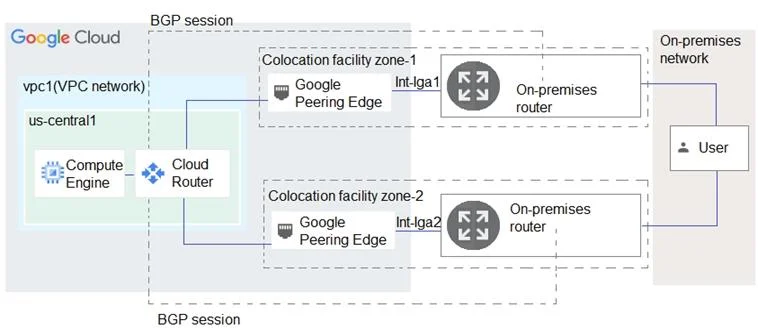
Options
- AConfigure the advertised route priority as 200 for the BGP session associated with the active
- BConfigure the advertised route priority > 10,200 on the active Interconnect connection.
- CAdvertise a lower MED on the active Interconnect connection from the on-premises router.
- DAdvertise a lower MED on the passive Interconnect connection from the on-premises router.
- EConfigure the advertised route priority as 200 for the BGP session associated with the passive
How the community answered
(62 responses)- A77% (48)
- B6% (4)
- D13% (8)
- E3% (2)
Explanation
To configure active/passive failover with Dedicated Interconnect on Google Cloud, you must control both egress (Google → on-premises) and ingress (on-premises → Google) traffic paths. For egress, Google Cloud uses the Cloud Router's advertised route priority: a higher priority value makes a route more preferred. Setting the active connection's BGP session priority to 200 (A) while leaving the passive connection at the default (100) ensures Google prefers the active path for outbound traffic. For ingress, on-premises routers use BGP MED (Multi-Exit Discriminator) to influence which path traffic takes into Google: a lower MED is preferred. Advertising a lower MED on the active connection (C) makes on-premises routers prefer sending traffic through it. Option D (lower MED on passive) is backwards. Option E (priority 200 on passive) would make passive preferred, inverting the requirement.
Topics
Community Discussion
No community discussion yet for this question.