
PROFESSIONAL-CLOUD-DEVOPS-ENGINEER · Question #128
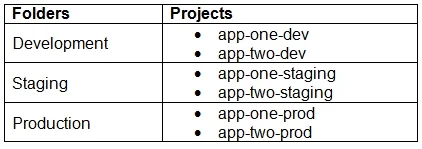
You are currently planning how to display Cloud Monitoring metrics for your organization's Google Cloud projects. Your organization has three folders and six projects: You want to configure Cloud…
The correct answer is B. Create new scoping projects for each folder. Cloud Monitoring uses a scoping project (formerly called a Workspace) to aggregate metrics from a set of monitored projects. To isolate metrics per folder, the Google-recommended practice is to create a dedicated scoping project for each folder and add only the projects within…
Question
Exhibit
Options
- ACreate a single new scoping project.
- BCreate new scoping projects for each folder.
- CUse the current app-one-prod project as the scoping project.
- DUse the current app-one-dev, app-one-staging, and app-one-prod projects as the scoping project
How the community answered
(29 responses)- A3% (1)
- B79% (23)
- C3% (1)
- D14% (4)
Explanation
Cloud Monitoring uses a scoping project (formerly called a Workspace) to aggregate metrics from a set of monitored projects. To isolate metrics per folder, the Google-recommended practice is to create a dedicated scoping project for each folder and add only the projects within that folder as monitored projects. This prevents cross-folder metric bleed. Option A (one scoping project for all) would mix metrics across folders. Option C (reuse an existing project) is not recommended because app-one-prod would scope only one folder. Option D (multiple existing projects as scoping projects) is architecturally incorrect - each scoping project defines one monitoring scope.
Topics
Community Discussion
No community discussion yet for this question.