
PROFESSIONAL-CLOUD-DEVELOPER · Question #58
Your application is deployed in a Google Kubernetes Engine (GKE) cluster. When a new version of your application is released, your CI/CD tool updates the spec.template.spec.containers[0].image value…
The correct answer is B. Set the Deployment strategy to RollingUpdate with maxSurge set to 1, maxUnavailable set to 0. The RollingUpdate strategy with maxSurge=1 and maxUnavailable=0 satisfies both requirements. maxSurge=1 allows Kubernetes to create one additional pod (the new version) above the desired replica count, so the new pod can start and become healthy before any old pods are removed…
Question
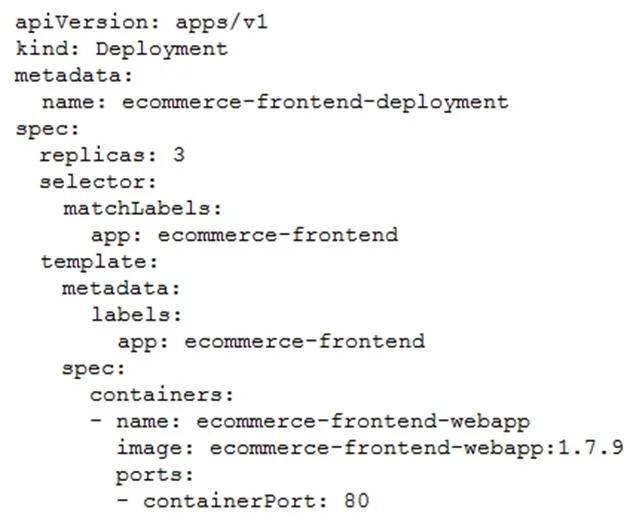
Your application is deployed in a Google Kubernetes Engine (GKE) cluster. When a new version of your application is released, your CI/CD tool updates the spec.template.spec.containers[0].image value to reference the Docker image of your new application version. When the Deployment object applies the change, you want to deploy at least 1 replica of the new version and maintain the previous replicas until the new replica is healthy. Which change should you make to the GKE Deployment object shown below?
Exhibit
Options
- ASet the Deployment strategy to RollingUpdate with maxSurge set to 0, maxUnavailable set to 1.
- BSet the Deployment strategy to RollingUpdate with maxSurge set to 1, maxUnavailable set to 0.
- CSet the Deployment strategy to Recreate with maxSurge set to 0, maxUnavailable set to 1.
- DSet the Deployment strategy to Recreate with maxSurge set to 1, maxUnavailable set to 0.
How the community answered
(23 responses)- A4% (1)
- B78% (18)
- C4% (1)
- D13% (3)
Explanation
The RollingUpdate strategy with maxSurge=1 and maxUnavailable=0 satisfies both requirements. maxSurge=1 allows Kubernetes to create one additional pod (the new version) above the desired replica count, so the new pod can start and become healthy before any old pods are removed. maxUnavailable=0 ensures no existing (old-version) pods are terminated until a replacement is confirmed healthy, preserving capacity throughout the update. Option A (maxSurge=0, maxUnavailable=1) would terminate an old pod before starting a new one, temporarily reducing capacity. Options C and D use the Recreate strategy, which terminates all old pods before creating new ones, causing downtime.
Topics
Community Discussion
No community discussion yet for this question.