
PROFESSIONAL-CLOUD-DEVELOPER · Question #49
Your teammate has asked you to review the code below. Its purpose is to efficiently add a large number of small rows to a BigQuery table. Which improvement should you suggest your teammate make?
The correct answer is A. Include multiple rows with each request. BigQuery's streaming insert API (tabledata.insertAll) accepts an array of rows per request, so inserting one row per API call for a large number of small rows is highly inefficient - it wastes API quota, increases latency due to per-request overhead, and can hit rate limits…
Question
Your teammate has asked you to review the code below. Its purpose is to efficiently add a large number of small rows to a BigQuery table. Which improvement should you suggest your teammate make?
Exhibit
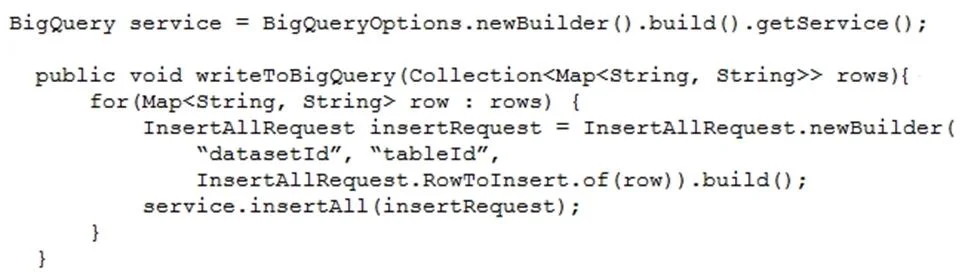
Options
- AInclude multiple rows with each request.
- BPerform the inserts in parallel by creating multiple threads.
- CWrite each row to a Cloud Storage object, then load into BigQuery.
- DWrite each row to a Cloud Storage object in parallel, then load into BigQuery.
How the community answered
(53 responses)- A94% (50)
- B4% (2)
- D2% (1)
Explanation
BigQuery's streaming insert API (tabledata.insertAll) accepts an array of rows per request, so inserting one row per API call for a large number of small rows is highly inefficient - it wastes API quota, increases latency due to per-request overhead, and can hit rate limits quickly. The most impactful improvement is to batch multiple rows into a single API request (Option A), which dramatically reduces the number of API calls and improves throughput. Option B (parallel threads) still sends individual rows and doesn't address the per-row API overhead. Options C and D (write to Cloud Storage then batch load) would work but introduce unnecessary complexity and latency for streaming inserts; the question specifically asks for an improvement to the existing row-insertion approach.
Topics
Community Discussion
No community discussion yet for this question.