
PROFESSIONAL-CLOUD-DEVELOPER · Question #385
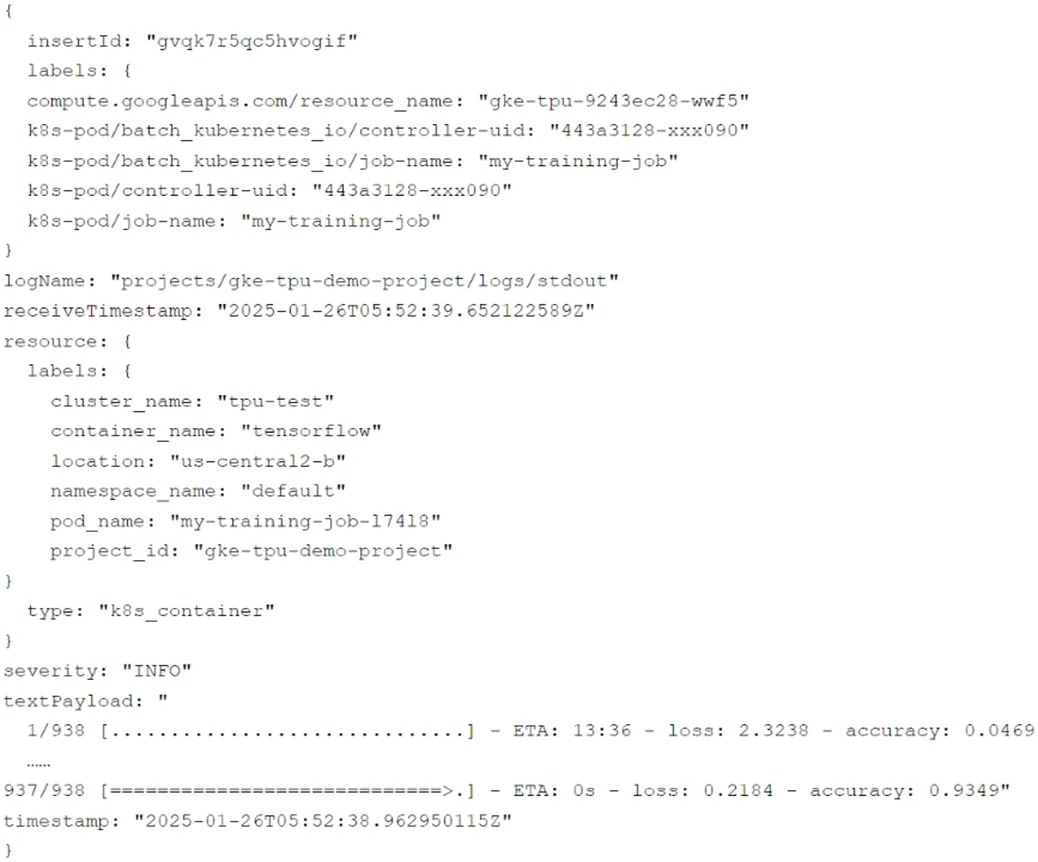
You have a GKE cluster that has three TPU nodes. You are running an ML training job on the cluster, and you observe log entries in Cloud Logging similar to the one below. To identify the root cause…
The correct answer is B. Run the following log query in Cloud Logging. The query shown in the chosen option filters logs for resources of type k8s_container and uses the label compute.googleapis.com/resource_name with the pattern gke-tpu-9243ec28.*, ensuring you retrieve all stdout logs from containers running specifically on the TPU nodes in your…
Question
You have a GKE cluster that has three TPU nodes. You are running an ML training job on the cluster, and you observe log entries in Cloud Logging similar to the one below. To identify the root cause of a performance issue, you need to view all stdout logs from the containers running on the TPU nodes. What should you do?
Exhibits



Options
- ARun the following log query in Cloud Logging:
- BRun the following log query in Cloud Logging:
- CRun the following command in Cloud Shell:
- DRun the following command in Cloud Shell:
How the community answered
(26 responses)- A15% (4)
- B69% (18)
- C4% (1)
- D12% (3)
Explanation
The query shown in the chosen option filters logs for resources of type k8s_container and uses the label compute.googleapis.com/resource_name with the pattern gke-tpu-9243ec28.*, ensuring you retrieve all stdout logs from containers running specifically on the TPU nodes in your GKE cluster. This directly matches the log label structure shown in the provided log entry.
Topics
Community Discussion
No community discussion yet for this question.