
PROFESSIONAL-CLOUD-DEVELOPER · Question #38
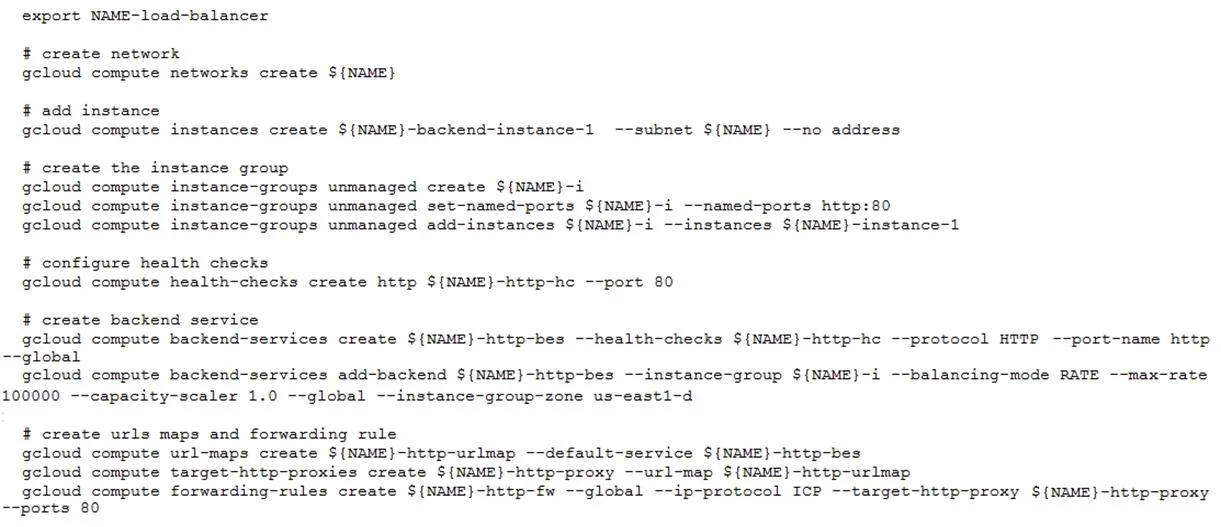
You have deployed an HTTP(s) Load Balancer with the gcloud commands shown below. Health checks to port 80 on the Compute Engine virtual machine instance are failing and no traffic is sent to your…
The correct answer is C. gcloud compute firewall-rules create allow-lb --network load-balancer -- allow tcp --source-ranges. When an HTTP(S) Load Balancer's health checks fail, it typically means the backend VM instances are not reachable from the load balancer's health check probers. Google Cloud's load balancer health check probes originate from specific IP ranges (130.211.0.0/22 and…
Question
You have deployed an HTTP(s) Load Balancer with the gcloud commands shown below. Health checks to port 80 on the Compute Engine virtual machine instance are failing and no traffic is sent to your instances. You want to resolve the problem. Which commands should you run?
Exhibit
Options
- Agcloud compute instances add-access-config ${NAME}-backend-instance-1
- Bgcloud compute instances add-tags ${NAME}-backend-instance-1 --tags http- server
- Cgcloud compute firewall-rules create allow-lb --network load-balancer -- allow tcp --source-ranges
- Dgcloud compute firewall-rules create allow-lb --network load-balancer -- allow tcp --destination-
How the community answered
(30 responses)- A3% (1)
- B7% (2)
- C80% (24)
- D10% (3)
Explanation
When an HTTP(S) Load Balancer's health checks fail, it typically means the backend VM instances are not reachable from the load balancer's health check probers. Google Cloud's load balancer health check probes originate from specific IP ranges (130.211.0.0/22 and 35.191.0.0/16). Without a firewall rule explicitly allowing TCP traffic from these source ranges to port 80 on the backend instances, the health probes are dropped. Option C creates a firewall rule on the 'load-balancer' network that allows incoming TCP traffic from the load balancer's source IP ranges, which is exactly what's needed. Option D is syntactically incorrect (uses --destination- which is invalid for this use case). Options A and B address access configs and network tags, which are unrelated to health check connectivity failures caused by missing firewall rules.
Topics
Community Discussion
No community discussion yet for this question.