
PROFESSIONAL-CLOUD-DEVELOPER · Question #265
You are deploying a Python application to Cloud Run using Cloud Source Repositories and Cloud Build. The Cloud Build pipeline is shown below: You want to optimize deployment times and avoid…
The correct answer is D. Add the --cache-from argument to the Docker build step in your build config file. Adding the '--cache-from' argument to the Docker build step instructs Docker to use a previously built and pushed image as a layer cache. For Python applications, the dependencies (pip install layer) rarely change between commits, so Docker can reuse those cached layers and…
Question
You are deploying a Python application to Cloud Run using Cloud Source Repositories and Cloud Build. The Cloud Build pipeline is shown below:
You want to optimize deployment times and avoid unnecessary steps. What should you do?
Exhibit
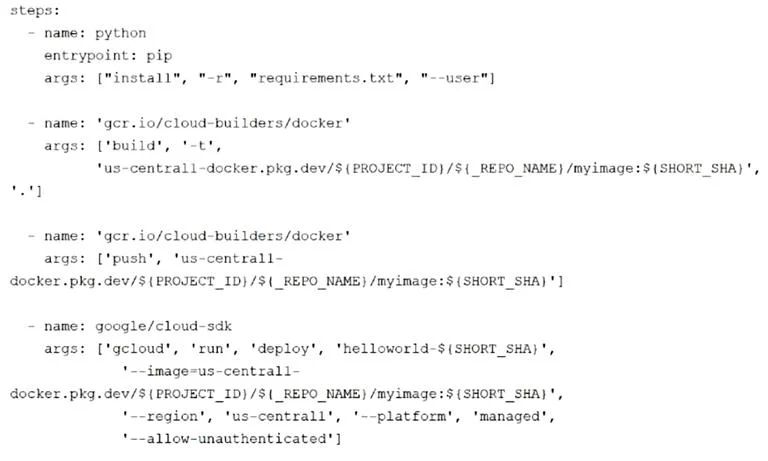
Options
- ARemove the step that pushes the container to Artifact Registry.
- BDeploy a new Docker registry in a VPC, and use Cloud Build worker pools inside the VPC to run
- CStore image artifacts in a Cloud Storage bucket in the same region as the Cloud Run instance.
- DAdd the --cache-from argument to the Docker build step in your build config file.
How the community answered
(24 responses)- A17% (4)
- B8% (2)
- C4% (1)
- D71% (17)
Explanation
Adding the '--cache-from' argument to the Docker build step instructs Docker to use a previously built and pushed image as a layer cache. For Python applications, the dependencies (pip install layer) rarely change between commits, so Docker can reuse those cached layers and only rebuild what changed, significantly reducing build times. Choice A is not viable because Artifact Registry must hold the image for Cloud Run to pull it. Choice B (VPC-based Docker registry with worker pools) adds infrastructure complexity without addressing the core build speed issue. Choice C is incorrect because Docker images cannot be stored in Cloud Storage; they require a container registry like Artifact Registry.
Topics
Community Discussion
No community discussion yet for this question.