
Google
PROFESSIONAL-CLOUD-ARCHITECT · Question #20
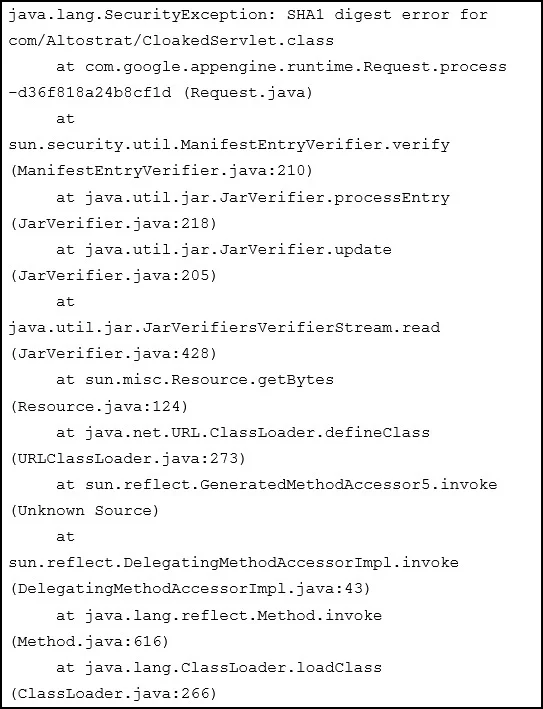
You deploy your custom Java application to Google App Engine. It fails to deploy and gives you the following stack trace. What should you do?
The correct answer is B. Digitally sign all of your JAR files and redeploy your application. Signing the JAR files grants it permissions. https://docs.oracle.com/javase/tutorial/deployment/jar/signindex.html
Submitted by katya_ua· Mar 30, 2026Managing implementation
Question
You deploy your custom Java application to Google App Engine. It fails to deploy and gives you the following stack trace. What should you do?
Exhibit
Options
- AUpload missing JAR files and redeploy your application.
- BDigitally sign all of your JAR files and redeploy your application
- CRecompile the CLoakedServlet class using and MD5 hash instead of SHA1
How the community answered
(28 responses)- A4% (1)
- B93% (26)
- C4% (1)
Explanation
Signing the JAR files grants it permissions. https://docs.oracle.com/javase/tutorial/deployment/jar/signindex.html
Topics
#App Engine#Java deployment#JAR signing#application deployment
Community Discussion
No community discussion yet for this question.