
PL-900 · Question #25
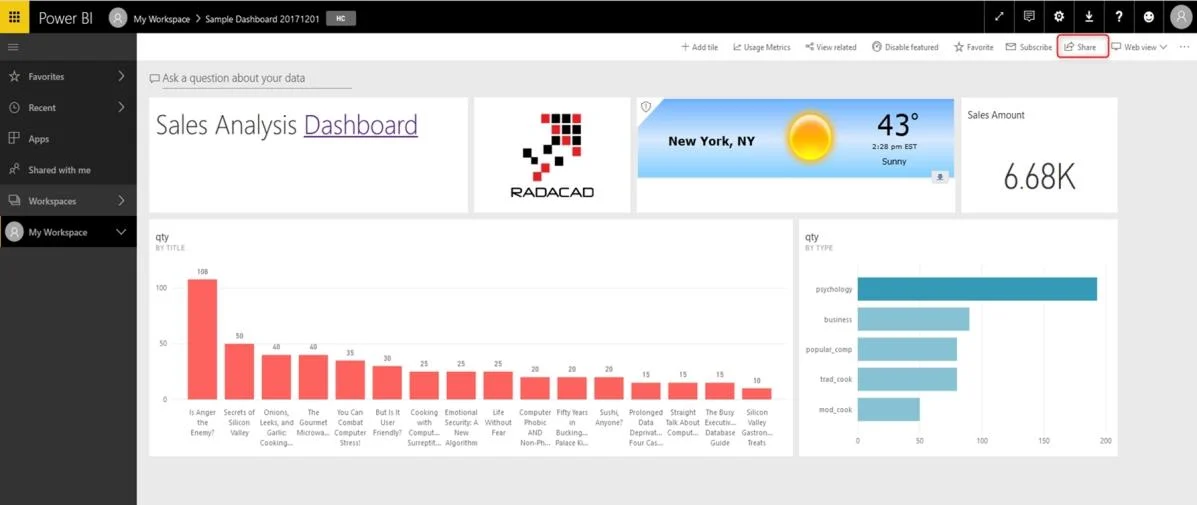
You create a Power BI dashboard that displays data from Dynamics 365 Customer Engagement. You need to share the Power BI dashboard with coworkers. What are three possible ways to achieve the goal?…
The correct answer is A. Create a Power BI workspace and grant coworkers permissions. B. Publish the dashboard as an app to your coworkers. E. Embed reports in your company's internal web portal. A: Basic Sharing for Dashboards and Reports through a workspace is the most common way of sharing the Power BI content. Basic Sharing is very simple and easy to use method. You can simply click on the Share button in the dashboard or report, and then share it with other users…
Question
Exhibit
Options
- ACreate a Power BI workspace and grant coworkers permissions.
- BPublish the dashboard as an app to your coworkers.
- CExport the data into Common Data Service for others to manipulate in Power BI.
- DExport the data to Microsoft Excel for coworkers to import and view in Power BI.
- EEmbed reports in your company's internal web portal.
How the community answered
(47 responses)- A87% (41)
- C4% (2)
- D9% (4)
Explanation
A: Basic Sharing for Dashboards and Reports through a workspace is the most common way of sharing the Power BI content. Basic Sharing is very simple and easy to use method. You can simply click on the Share button in the dashboard or report, and then share it with other users. B: Apps are great sharing method for multiple environment, and best way of sharing for users in production environment. Power BI App is the solution for multiple environment approach. With Power BI App, your development environment (workspace), and user environment (App) are isolated from each other. Note: If you are using SharePoint online as a portal for document management and some other reasons already, then consider using Embed in SharePoint Online feature of Power BI reports. This method is secure and you can share the report only with Power BI users you want. E: Sometimes, you don't need a secure way of sharing, you may search for an easy and free way of sharing, and your content is not confidential or sensitive. Publish to web is your friend in such This is the only free way of sharing in Power BI, but be aware that this method is not secure. Publish to web method, gives you an embed code, which you can use in any web pages to embed the Power BI report in it https://radacad.com/power-bi-sharing-methods-comparison-all-in-one-review
Topics
Community Discussion
No community discussion yet for this question.