
PL-500 · Question #92
Drag and Drop Question You plan to implement a data loss prevention (DLP) policy for a production environment. You need to define the policy. Which four actions should you perform in sequence? To…
The correct answer is Name the policy.; Classify and assign connectors.; Define the scope and add the environment to the policy.; Review and create the policy. To define a Data Loss Prevention (DLP) policy, the correct sequence of actions involves naming the policy, defining its scope by adding the target environment, classifying and assigning connectors, and finally reviewing and creating the policy.
Question
Drag and Drop Question You plan to implement a data loss prevention (DLP) policy for a production environment. You need to define the policy. Which four actions should you perform in sequence? To answer, move the appropriate actions from the list of actions to the answer area and arrange them in the correct order. Answer:
Exhibit
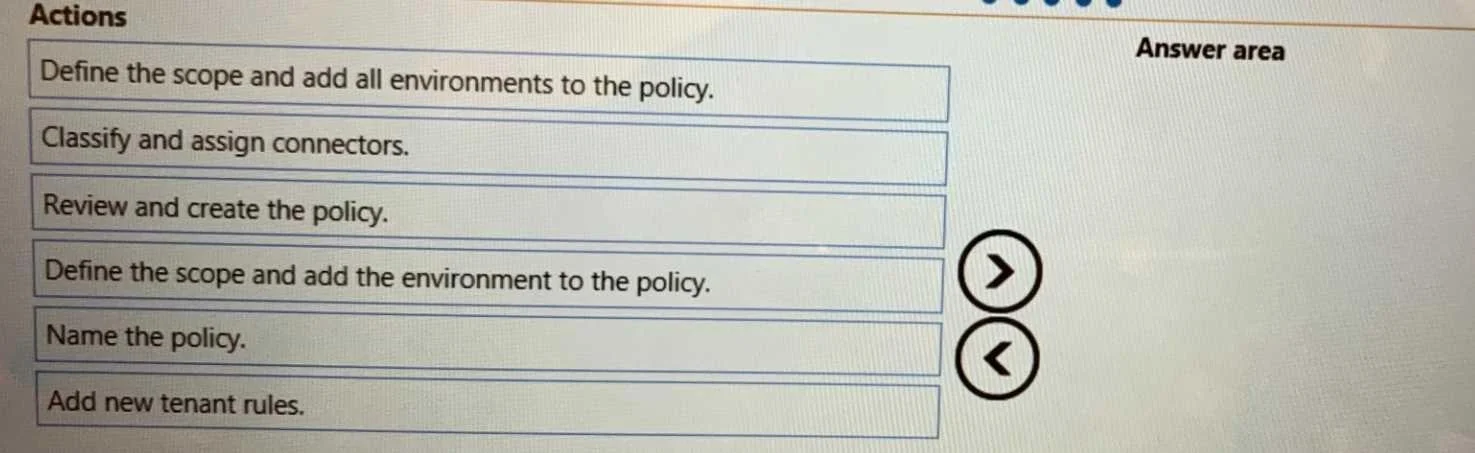
Answer Area
Drag items
Correct arrangement
- Name the policy.
- Classify and assign connectors.
- Define the scope and add the environment to the policy.
- Review and create the policy.
Explanation
To define a Data Loss Prevention (DLP) policy, the correct sequence of actions involves naming the policy, defining its scope by adding the target environment, classifying and assigning connectors, and finally reviewing and creating the policy.
Approach. The scenario describes implementing a Data Loss Prevention (DLP) policy for a production environment. This specific context, combined with the option 'Classify and assign connectors', strongly suggests a Power Platform DLP policy. The standard sequential steps for creating such a policy are:
- Name the policy: Every new policy must start with a unique and descriptive name for identification and management purposes. This is always the initial step in any policy creation wizard.
- Define the scope and add the environment to the policy: After naming, the next logical step is to specify where the policy will apply. In Power Platform DLP, this involves defining the scope. The phrase 'add the environment' typically refers to selecting and adding specific environments when the scope is not set to 'All environments', which aligns well with implementing a policy for 'a production environment' (implying a specific target).
- Classify and assign connectors: This is a crucial configuration step for Power Platform DLP. Once the scope is defined, you categorize connectors into 'Business' or 'Non-business' data groups to control data movement and prevent leakage between different types of applications.
- Review and create the policy: The final step in any policy creation process is to review all the configured settings, ensure they meet the requirements, and then finalize (create or publish) the policy to make it active. This ensures that no errors are present before deployment.
Common mistakes.
- common_mistake. Selecting 'Define the scope and add all environments to the policy' instead of 'Define the scope and add the environment to the policy' would be a common mistake. While 'all environments' is a valid scope option, the question mentions 'a production environment', which often implies a specific scope rather than a blanket application across all environments (including potentially non-production ones). In a drag-and-drop question where only one scope definition option can be chosen, 'add the environment' is more precise for targeting a specific environment. Another common mistake would be to include 'Add new tenant rules'. 'Rules' are part of a DLP policy's configuration (defining conditions and actions), but 'Add new tenant rules' is not a distinct, high-level sequential step in defining a single DLP policy. This option is either too granular or misphrased for the high-level sequence required.
Concept tested. The underlying technical concept being tested is the administrative workflow and configuration steps for implementing Data Loss Prevention (DLP) policies, particularly in the context of Microsoft Power Platform, which involves understanding how to define policy scope, classify connectors, and publish the policy.
Topics
Community Discussion
No community discussion yet for this question.