
PL-500 · Question #1100
Drag and Drop Question You are creating a purchase requisition model-driven application for a company. Access to the app must be limited to only a few specific employees. After the app is deployed…
The correct answer is Search for the user with whom to share.; Select the security role for the user.; Send an invitation email. To share a model-driven app, you must first identify the user, then assign them an appropriate security role, and finally send an invitation to grant access.
Question
Exhibit
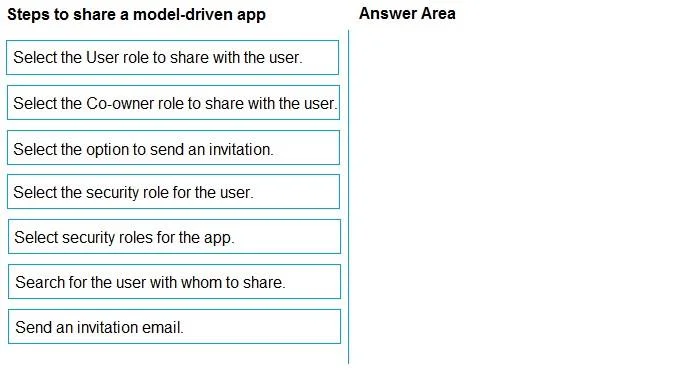
Answer Area
Drag items
Correct arrangement
- Search for the user with whom to share.
- Select the security role for the user.
- Send an invitation email.
Explanation
To share a model-driven app, you must first identify the user, then assign them an appropriate security role, and finally send an invitation to grant access.
Approach. The correct sequence to share a model-driven app with specific users involves three primary steps:
- Search for the user with whom to share. - Before you can assign permissions or send an invitation, you must identify the specific user(s) you intend to share the app with. This is the foundational step.
- Select the security role for the user. - Once the user is identified, you need to define their level of access and permissions within the app. This is done by assigning a pre-defined security role that dictates what actions they can perform (e.g., read, write, create, delete).
- Send an invitation email. - The final step is to formally grant access and notify the user. Sending an invitation email ensures the user receives a link to the app and is aware that it has been shared with them, completing the sharing process. This action typically finalizes the access provisioning.
Common mistakes.
- common_mistake. Common mistakes include selecting roles that are too specific or inappropriate for general users, such as 'Select the User role to share with the user' (which might be a specific default role, but 'security role for the user' is more general and accurate for the concept) or 'Select the Co-owner role to share with the user' (Co-owner grants administrative privileges, which is usually not for end-users). Another mistake is confusing 'Select security roles for the app' (which refers to configuring or managing the roles themselves) with 'Select the security role for the user' (which is about assigning an existing role to a user). Lastly, 'Select the option to send an invitation' is an action preceding the actual sending, whereas 'Send an invitation email' is the definitive action that completes the sharing and notification process.
Concept tested. Sharing and access management for model-driven applications, specifically focusing on user identification, role-based access control (RBAC), and user notification in the Microsoft Power Platform ecosystem.
Topics
Community Discussion
No community discussion yet for this question.