
PL-400 · Question #237
You are creating a Power Apps Component Framework (PCF) component. You add the following markup to the component manifest. (Line numbers are included for reference only.) You need to complete the…
The correct answer is B. <control namespace="PowerContoso" constructor="CtlProducts" version="0.0.10" display-name-. In the PCF (Power Apps Component Framework) component manifest XML, the <control> element requires a namespace attribute to identify the component's namespace. The correct syntax is <control namespace="PowerContoso" constructor="CtlProducts" version="0.0.10" ...>. The namespace…
Question
Exhibit
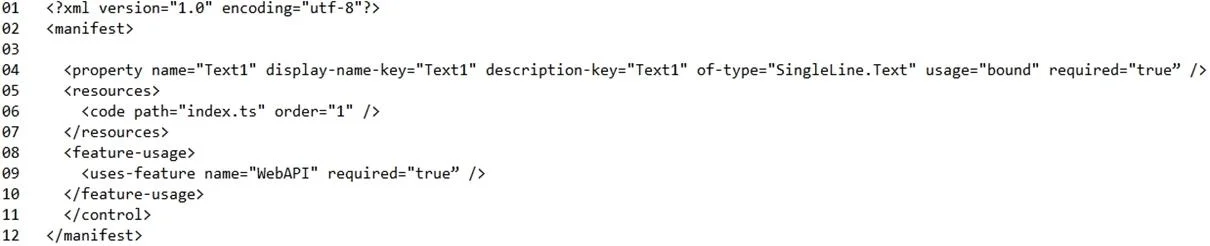
Options
- A<control DisplayNameKey="PowerContoso" constructor="CtlProducts" version="0.0.10" display-
- B<control namespace="PowerContoso" constructor="CtlProducts" version="0.0.10" display-name-
- C<control code="PowerContoso" constructor="CtlProducts" version="0.0.10" display-name-
- D<control name="PowerContoso" constructor="CtlProducts" version="0.0.10" display-name-
- E<control _value="PowerContoso" constructor="CtlProducts" version="0.0.10" display-name-
How the community answered
(22 responses)- B77% (17)
- C5% (1)
- D5% (1)
- E14% (3)
Explanation
In the PCF (Power Apps Component Framework) component manifest XML, the <control> element requires a namespace attribute to identify the component's namespace. The correct syntax is <control namespace="PowerContoso" constructor="CtlProducts" version="0.0.10" ...>. The namespace groups related components together and is a required attribute in the manifest schema. Options A (DisplayNameKey), C (code), D (name), and E (_value) are not valid attributes for identifying the namespace of a PCF control element. Using an invalid attribute will cause the manifest to fail validation, preventing the component from being registered and deployed.
Community Discussion
No community discussion yet for this question.