
PL-400 · Question #227
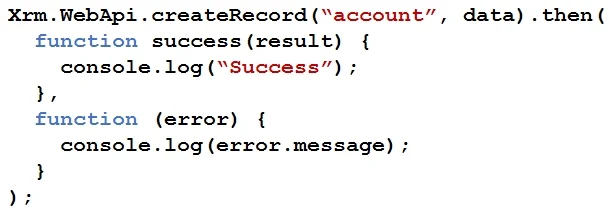
You have the following code: You have a contact record that uses the GUID 991bf2fd-d40c-4752-9984-26b7c0455b69. You need to assign the contact record as the primary contact for an account when you…
The correct answer is A. var data = { "name": "Contoso account", "primarycontactid": { "logicalname": "contact", "id": B. var data = { "name": "Contoso account", "[email protected]": "/contacts(991bf2fd-. B: To associate new table records to existing table records, set the value of single-valued navigation properties using the @odata.bind annotation "name": "Sample Account", "[email protected]": "/contacts(465b158c-541c-e511-80d3-3863bb347ba8)" A: For mobile clients in…
Question
Exhibit
Options
- Avar data = { "name": "Contoso account", "primarycontactid": { "logicalname": "contact", "id":
- Bvar data = { "name": "Contoso account", "[email protected]": "/contacts(991bf2fd-
- Cvar data = { "name": "Contoso account", "[email protected]": "/contacts(991bf2fd-
- Dvar data = { "name": "Contoso account", "primarycontactid": "/contacts(991bf2fd-d40c-4752-9984-
How the community answered
(46 responses)- A74% (34)
- C9% (4)
- D17% (8)
Explanation
B: To associate new table records to existing table records, set the value of single-valued navigation properties using the @odata.bind annotation "name": "Sample Account", "[email protected]": "/contacts(465b158c-541c-e511-80d3-3863bb347ba8)" A: For mobile clients in the offline mode, you cannot use the @odata.bind annotation, and instead have to pass a lookup object (logicalname and id) pointing to the target record. var data = "name": "Sample Account", "primarycontactid": "logicalname": "contact", "id": "465b158c-541c-e511-80d3-3863bb347ba8" Xrm.WebApi.createRecord(entityLogicalName, data).then(successCallback, errorCallback); entityLogicalName: Logical name of the table you want to create. For example: "account". Data: A JSON object defining the columns and values for the new table record. https://docs.microsoft.com/en-us/powerapps/developer/model-driven- apps/clientapi/reference/xrm-webapi/createrecord
Community Discussion
No community discussion yet for this question.