
PL-100 · Question #329
Drag and Drop Question You use Microsoft Dynamics 365 Sales. Business processes must use data from multiple applications. You need to implement the correct type of automation. Which flow type should…
The correct answer is cloud flow; desktop flow. The question tests the ability to distinguish between different types of automation flows - cloud flows, desktop flows, and business process flows - and apply them to appropriate real-world scenarios in a Microsoft Dynamics 365 context.
Question
Exhibit
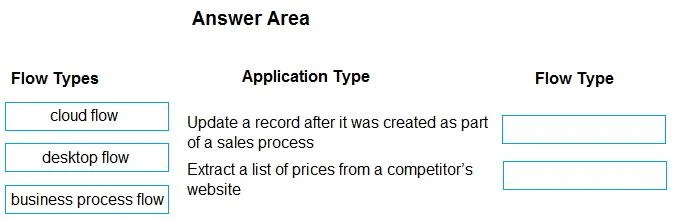
Answer Area
Drag items
Correct arrangement
- cloud flow
- desktop flow
Explanation
The question tests the ability to distinguish between different types of automation flows - cloud flows, desktop flows, and business process flows - and apply them to appropriate real-world scenarios in a Microsoft Dynamics 365 context.
Approach. To correctly answer, you must drag 'cloud flow' to the 'Update a record after it was created as part of a sales process' scenario and 'desktop flow' to the 'Extract a list of prices from a competitor's website' scenario.
-
'Update a record after it was created as part of a sales process' - 'cloud flow': Cloud flows (part of Power Automate) are ideal for automating tasks that connect cloud services and applications. Updating a record after creation is typically an event-driven automation that integrates different systems (e.g., Dynamics 365 with another database or application), making a cloud flow the appropriate choice.
-
'Extract a list of prices from a competitor's website' - 'desktop flow': Desktop flows (part of Power Automate Desktop) are used for Robotic Process Automation (RPA), which involves automating tasks on desktop applications and websites by mimicking human interactions. Web scraping, like extracting prices from a website, is a classic use case for desktop flows because it involves interacting with a user interface in a repetitive manner. 'business process flow' is not used because it defines a guided user experience for a specific business process within Dynamics 365/Dataverse, rather than performing automated actions or web scraping.
Common mistakes.
- common_mistake. A common mistake would be to confuse cloud flows with desktop flows, or to incorrectly apply business process flows. For example, using a 'desktop flow' to 'Update a record after it was created' would be incorrect because this is typically an API-driven or connector-based integration best handled by a cloud flow, not UI automation. Conversely, trying to use a 'cloud flow' to 'Extract a list of prices from a competitor's website' would be difficult or impossible if the website doesn't offer an API; this task requires UI automation provided by a desktop flow.
Another mistake would be to use 'business process flow' for either scenario. A 'business process flow' guides a user through stages and steps of a record's lifecycle within a model-driven app (like Dynamics 365), ensuring data consistency and specific steps are followed. It doesn't automate the update of records in the background (that's a cloud flow) nor does it perform web scraping (that's a desktop flow). Its purpose is user guidance, not direct system automation or external data extraction.
Concept tested. The core concept being tested is the understanding of different Power Automate flow types (Cloud flows, Desktop flows) and their specific use cases, as well as the distinction between these automation types and Dynamics 365 'business process flows' in the context of business process automation and integration within the Microsoft Power Platform.
Topics
Community Discussion
No community discussion yet for this question.