
PL-100 · Question #242
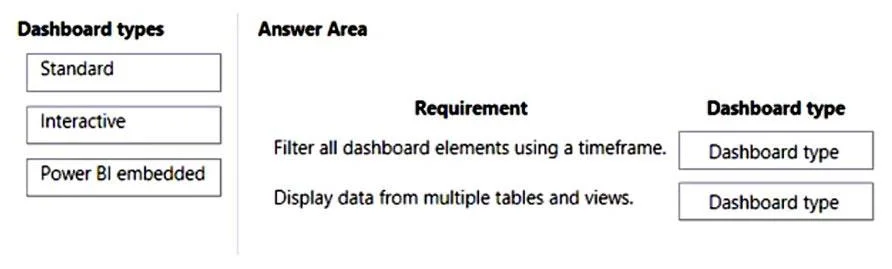
Drag and Drop Question You are designing a dashboard for a model-driven app. Users are licensed to use Dynamics 365 Sales Professional. Users must be able to filter the dashboard. You need to…
The correct answer is Interactive; Standard. A model-driven app dashboard requiring filtering all elements by timeframe should be Interactive, while one needing to display data from multiple tables and views should be Standard.
Question
Exhibit
Answer Area
Drag items
Correct arrangement
- Interactive
- Standard
Explanation
A model-driven app dashboard requiring filtering all elements by timeframe should be Interactive, while one needing to display data from multiple tables and views should be Standard.
Approach. For the requirement 'Filter all dashboard elements using a timeframe,' the correct choice is 'Interactive.' Interactive dashboards in Dynamics 365 are specifically designed to provide a unified filtering experience, allowing users to apply global filters (including timeframe filters like 'Today,' 'This Week,' 'Last 30 Days') that affect all charts and streams on the dashboard simultaneously. This capability is central to their design, especially for monitoring and acting on dynamic data.
For the requirement 'Display data from multiple tables and views,' the correct choice is 'Standard.' Standard dashboards (also known as System or User Dashboards) are highly flexible and allow creators to add various components such as charts, lists (views), IFrames, and web resources from multiple different entities (tables) and their associated views onto a single canvas. This makes them ideal for consolidating information from diverse data sources within Dynamics 365 into one dashboard.
Common mistakes.
- common_mistake. Using 'Power BI embedded' for 'Filter all dashboard elements using a timeframe' is incorrect because, while Power BI offers powerful filtering, the question implies native Dynamics 365 dashboard filtering capabilities, where an 'Interactive' dashboard directly offers the described global timeframe filter. 'Standard' dashboards are incorrect for filtering all elements by timeframe as they lack the dynamic, global filtering capabilities of interactive dashboards.
Using 'Interactive' for 'Display data from multiple tables and views' is incorrect because interactive dashboards are typically optimized around a primary entity for their global filters. While they can show related data, they are not as generically flexible as 'Standard' dashboards for displaying arbitrary views and charts from many disparate, unrelated entities on the same canvas. 'Power BI embedded' is incorrect for this context because, although Power BI excels at this, the question asks to distinguish between native Dynamics 365 dashboard types, and Power BI embedded represents an integration, not a core native dashboard type in the same architectural sense as Standard or Interactive dashboards.
Concept tested. The question tests the understanding of different dashboard types in Microsoft Dynamics 365 or Power Apps model-driven apps - Standard, Interactive, and Power BI embedded - and their specific features, capabilities, and ideal use cases, particularly concerning data sources and filtering mechanisms.
Topics
Community Discussion
No community discussion yet for this question.