
PDI · Question #237
When the code executes, a DML exception is thrown. How should a developer modify the code to ensure exceptions are handled gracefully?
The correct answer is C. Implement a try/catch block for the DML. To gracefully handle DML exceptions that are thrown during code execution, a developer should implement a try/catch block around the DML statement.
Question
When the code executes, a DML exception is thrown. How should a developer modify the code to ensure exceptions are handled gracefully?
Exhibit
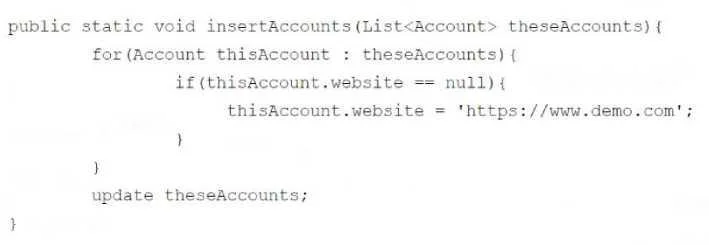
Options
- AImplement the upsert DML statement.
- BImplement Change Data Capture.
- CImplement a try/catch block for the DML.
- DRemove null items from the list of Accounts.
How the community answered
(19 responses)- A11% (2)
- C84% (16)
- D5% (1)
Why each option
To gracefully handle DML exceptions that are thrown during code execution, a developer should implement a try/catch block around the DML statement.
The upsert DML statement prevents certain types of DML errors (like duplicate records based on external ID) but does not provide a general mechanism for gracefully handling all DML exceptions.
Change Data Capture is a feature for asynchronously processing record changes, not for handling synchronous DML exceptions within executing code.
A try/catch block is the standard and most effective programming construct in Apex for gracefully catching and managing runtime exceptions, including those thrown during DML operations, allowing the developer to control program flow and provide appropriate error responses.
While removing null items could prevent specific DML errors related to required fields, it is not a comprehensive or general solution for gracefully handling all potential DML exceptions.
Concept tested: Apex DML exception handling
Source: https://developer.salesforce.com/docs/atlas.en-us.apexcode.meta/apexcode/apex_exception_handling.htm
Topics
Community Discussion
No community discussion yet for this question.