
PDI · Question #10
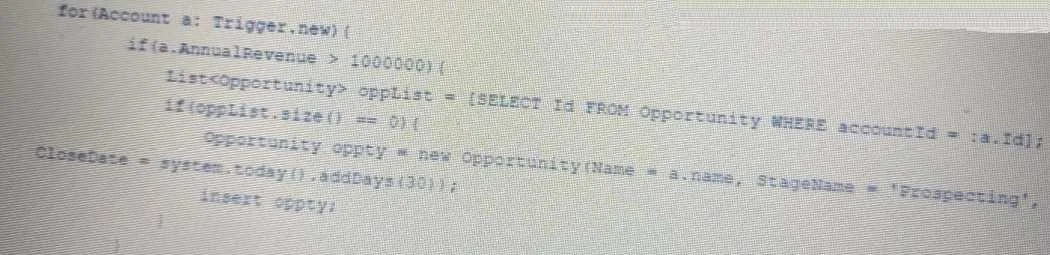
Management asked for opportunities to be automatically created for accounts with annual revenue greater than $1,000,000. A developer created the following trigger on the Account object to satisfy…
The correct answer is C. Move the DML that saves opportunities outside the for loop. D. Query for existing opportunities outside the for loop. An Account trigger works for single record updates but fails when bulk loading 179 accounts, indicating governor limit issues.
Question
Management asked for opportunities to be automatically created for accounts with annual revenue greater than $1,000,000. A developer created the following trigger on the Account object to satisfy this requirement. Users are able to update the account records via the UI and can see an opportunity created for high annual revenue accounts. However, when the administrator tries to upload a list of 179 accounts using Data Loader, It fails with system. Exception errors. Which two actions should the developer take to fix the code segment shown above? Choose 2 answers
Exhibit
Options
- ACheck if all the required fields for Opportunity are being added on creation.
- BUse Database.query to query the opportunities.
- CMove the DML that saves opportunities outside the for loop.
- DQuery for existing opportunities outside the for loop.
How the community answered
(49 responses)- A10% (5)
- B6% (3)
- C84% (41)
Why each option
An Account trigger works for single record updates but fails when bulk loading 179 accounts, indicating governor limit issues.
While ensuring all required fields are populated is crucial for successful record creation, it's a functional requirement and not the primary cause of 'system.Exception errors' specifically linked to bulk data loader operations, which typically point to governor limits due to unbulkified code.
`Database.query` is a dynamic SOQL method, but merely using it doesn't solve the problem of performing a query *inside* a loop, which is the cause of governor limit violations during bulk processing.
Moving DML operations (like `insert` statements for Opportunities) outside of `for` loops ensures that DML statements are executed on a list of records in a single call, preventing governor limit exceptions during bulk operations.
Querying for existing opportunities (SOQL queries) outside of `for` loops ensures that queries are executed once on a collection of relevant IDs, rather than for each individual record, which avoids hitting SOQL query governor limits during bulk processing.
Concept tested: Apex Trigger Bulkification for DML and SOQL
Source: https://developer.salesforce.com/docs/atlas.en-us.apexcode.meta/apexcode/apex_triggers_bestpractices.htm
Topics
Community Discussion
No community discussion yet for this question.