nerdexam
Palo_Alto_Networks

PCNSE · Question #740

Given the following snippet of a WildFire submission log, did the end user successfully download a file?

The correct answer is B. No, because the action for the wildfire-virus is "reset-both.". To determine if an end-user successfully downloaded a file, review the WildFire submission log for the final action taken on the wildfire-virus application. If the action is "reset-both," the download was prevented.

Submitted by carlos_mx· Apr 18, 2026Operate

Question

Given the following snippet of a WildFire submission log, did the end user successfully download a file?

Exhibit
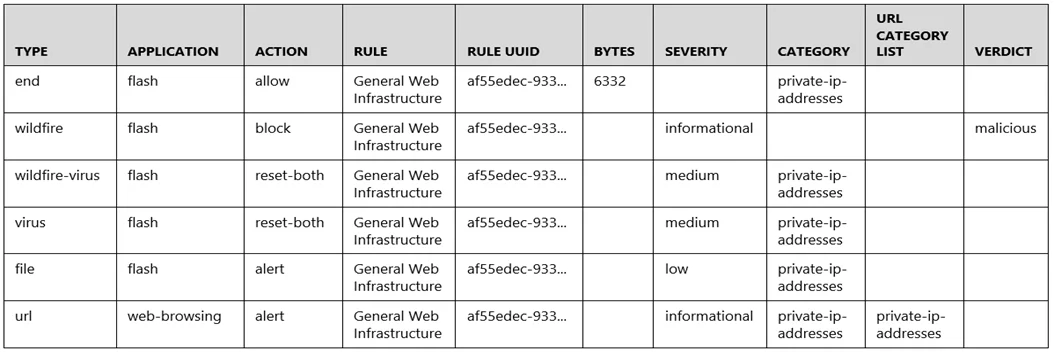
PCNSE question #740 exhibit

Options

  • AYes, because the final action is set to "allow."
  • BNo, because the action for the wildfire-virus is "reset-both."
  • CNo, because the URL generated an alert.
  • DYes, because both the web-browsing application and the flash file have the "alert" action.

How the community answered

(21 responses)
  • A
    5% (1)
  • B
    90% (19)
  • D
    5% (1)

Why each option

To determine if an end-user successfully downloaded a file, review the WildFire submission log for the final action taken on the `wildfire-virus` application. If the action is "reset-both," the download was prevented.

AYes, because the final action is set to "allow."

An 'allow' action on a general traffic log entry would not specifically confirm the prevention of a `wildfire-virus` download, as the `wildfire-virus` action itself takes precedence for the specific threat.

BNo, because the action for the wildfire-virus is "reset-both."Correct

The 'reset-both' action for the `wildfire-virus` application indicates that the firewall actively terminated the connection from both sides, preventing the malicious file download from completing. This action directly confirms that the file transfer was interrupted, making the download unsuccessful.

CNo, because the URL generated an alert.

An alert generated by a URL might indicate suspicious activity but does not definitively confirm whether a subsequent file download was prevented or allowed; the specific action on the `wildfire-virus` detection is key.

DYes, because both the web-browsing application and the flash file have the "alert" action.

The 'alert' action for web-browsing and flash indicates detection of potential threats or interesting activity, but it does not mean the file download was successfully allowed; the critical factor is the `wildfire-virus` action.

Concept tested: WildFire log analysis for file prevention

Source: https://docs.paloaltonetworks.com/pan-os/10-2/pan-os-admin/wildfire/wildfire-log-fields

Topics

#WildFire#Threat Prevention#Log Interpretation#Firewall Actions

Community Discussion

No community discussion yet for this question.

Full PCNSE Practice