
PCNSE · Question #670
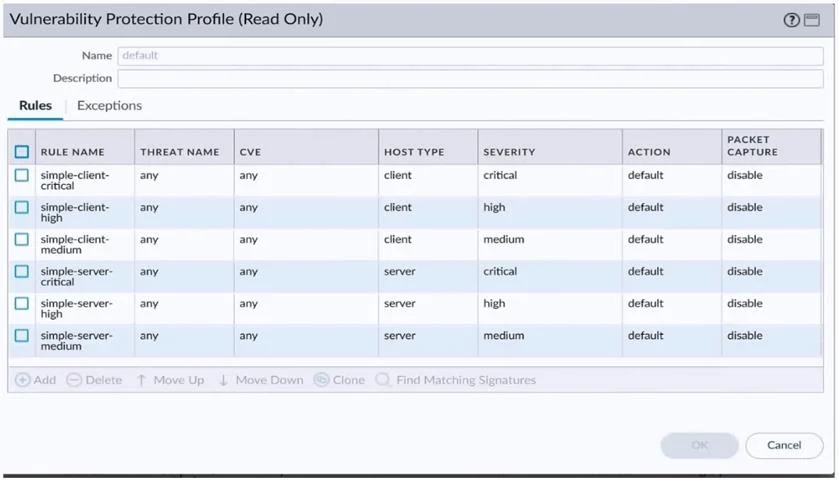
An administrator would like to determine which action the firewall will take for a specific CVE. Given the screenshot below, where should the administrator navigate to view this information?
The correct answer is D. Exceptions tab. In a Vulnerability Protection profile, the Exceptions tab is where administrators can view and configure per-threat overrides, including actions tied to specific CVEs or Threat IDs. The main Rules tab sets broad category-level actions (block, alert, reset, etc.), but individual…
Question
An administrator would like to determine which action the firewall will take for a specific CVE. Given the screenshot below, where should the administrator navigate to view this information?
Exhibit
Options
- AThe profile rule action
- BCVE column
- CThe profile rule threat name
- DExceptions tab
How the community answered
(38 responses)- A3% (1)
- B3% (1)
- D95% (36)
Explanation
In a Vulnerability Protection profile, the Exceptions tab is where administrators can view and configure per-threat overrides, including actions tied to specific CVEs or Threat IDs. The main Rules tab sets broad category-level actions (block, alert, reset, etc.), but individual CVE-level actions - including any custom exceptions that override the default - are found exclusively in the Exceptions tab. The CVE column in the Exceptions tab allows searching or filtering by CVE number to quickly locate the specific threat and confirm what action the firewall will take.
Topics
Community Discussion
No community discussion yet for this question.