
PCNSE · Question #57
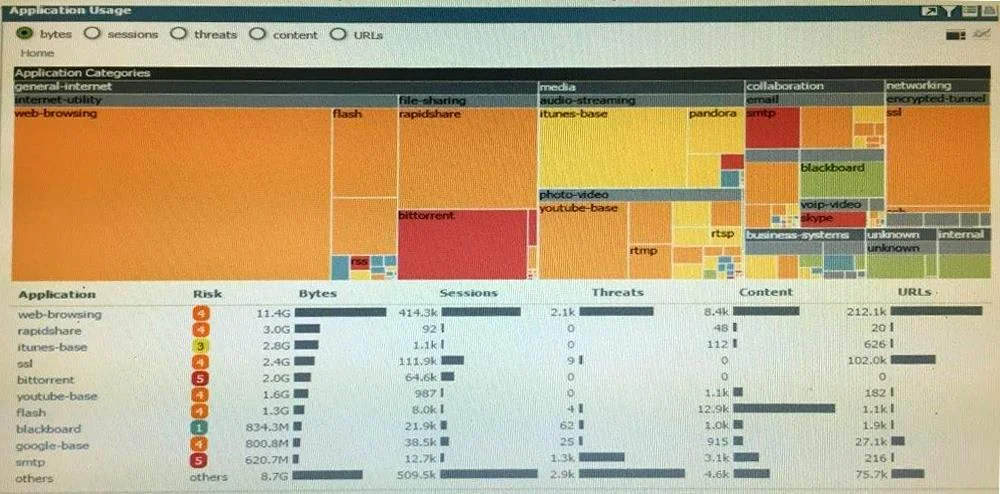
Click the Exhibit button. An administrator has noticed a large increase in bittorrent activity. The administrator wants to determine where the traffic is going on the company. What would be the…
The correct answer is D. Click on the bittorrent application link to view network activity. In the Palo Alto Networks Application Command Center (ACC), application names shown in the charts and tables are interactive links. Clicking directly on an application name such as 'bittorrent' drills down into that application's network activity, revealing details such as…
Question
Click the Exhibit button. An administrator has noticed a large increase in bittorrent activity. The administrator wants to determine where the traffic is going on the company. What would be the administrator's next step?
Exhibit
Options
- ARight-Click on the bittorrent link and select Value from the context menu
- BCreate a global filter for bittorrent traffic and then view Traffic logs.
- CCreate local filter for bittorrent traffic and then view Traffic logs.
- DClick on the bittorrent application link to view network activity
How the community answered
(14 responses)- A7% (1)
- C7% (1)
- D86% (12)
Explanation
In the Palo Alto Networks Application Command Center (ACC), application names shown in the charts and tables are interactive links. Clicking directly on an application name such as 'bittorrent' drills down into that application's network activity, revealing details such as source and destination IP addresses, session counts, bytes transferred, and users involved. This is the most direct and efficient method to determine where bittorrent traffic is going. Creating a global or local filter (Choices B and C) is a secondary approach useful in the Traffic logs tab, and right-clicking for 'Value' (Choice A) is not a valid ACC workflow for this purpose.
Topics
Community Discussion
No community discussion yet for this question.